engineering · Fresher-friendly
Frontend Developer Interview Questions India 2026
Curated Frontend Developer interview questions for Indian product companies and campus placements — with hiring process guides, topic importance charts, React vs Angular vs Vue comparison, common mistakes, and a 30-day preparation roadmap.
On this page
Frontend Developer Interview Process (2026)
Most Frontend Developer loops in India — campus drives and product companies — follow the sequence below. Each stage filters a different signal: JavaScript depth, UI craft, architecture thinking, or communication. New to campus hiring? Start with our placement interview guide.
Step 1 — Application
Recruiters scan for React or modern JS project depth, live demos or GitHub links, and measurable UI impact — load time improved, conversion uplift, accessibility fixes. Tailor bullets to components shipped, not tutorial clones.
Step 2 — Online Assessment
Timed OA with JavaScript MCQs, DOM/CSS puzzles, debugging snippets, and sometimes 1–2 easy coding problems (arrays, strings). Campus and lateral pipelines at TCS, Accenture, Zoho, and product firms filter heavily here.
Step 3 — Frontend Round 1
JavaScript fundamentals, closures, event loop, DOM APIs, CSS layout (Flexbox/Grid), and basic React concepts — props, state, hooks. Expect live coding on a small UI widget or algorithmic JS problem with spoken reasoning.
Step 4 — Frontend Round 2
Deeper React — state management, performance, custom hooks, TypeScript types, testing mindset. May include code review of your component, refactoring exercise, or building a feature with API integration.
Step 5 — System Design / UI Architecture
Design a dashboard, design system, or high-traffic page: component boundaries, data flow, caching, lazy loading, error boundaries, and API contract. Senior loops add frontend system design; fresher loops may use a lighter architecture discussion.
Step 6 — Behavioral
Collaboration with designers, handling feedback, deadline pressure, and conflict resolution. Prepare STAR stories on accessibility wins, performance fixes, and cross-functional delivery.
Step 7 — Offer
Selected candidates receive level, compensation, and joining timeline. Frontend Developer packages in India typically range 4–12 LPA for 0–2 YOE at service firms and 10–25+ LPA at product companies — negotiate after level confirmation.
Frontend Developer Interview Process 2026
- 1–5 days
Application
Resume & portfolio screen
Ship 1–2 projects with README, live demo link, and measurable UI impact bullets.
React portfolioGitHubResume - 60–90 min
Online Assessment
Aptitude + JS filter
Practice timed JS MCQs, CSS layout puzzles, and 1–2 easy array/string problems.
JavaScript MCQsCSSEasy DSA - 45–60 min
Frontend Round 1
JS & DOM fundamentals
Explain closures, event loop, Flexbox/Grid, and build a small UI widget live.
ClosuresDOM APIsCSS LayoutReact basics - 60–90 min
Frontend Round 2
React depth + coding
Refactor a component, integrate an API, discuss hooks, TypeScript types, and state flow.
HooksTypeScriptState mgmtAPI fetch - 45–60 min
System Design / UI Architecture
Architecture & trade-offs
Design a dashboard or feed: component boundaries, caching, lazy load, error boundaries.
Component designPerformanceCachingData flow - 30–45 min
Behavioral
Communication & teamwork
Prepare STAR stories on designer collaboration, deadlines, and accessibility wins.
STAR formatCross-functionalConflict - 3–10 days
Offer
Level & compensation
Confirm role level, stack, and joining date before negotiating — product vs service bands differ.
CTC breakdownESOPLevel
Company-specific loops differ — compare Freshworks Frontend interviews, TCS Frontend interviews, and Zoho Frontend interviews.
Frontend Developer Learning Roadmap
Step-by-step path from HTML and CSS fundamentals to interview readiness. Do not skip JavaScript depth — React interviews still fail candidates on closures, async, and the event loop.
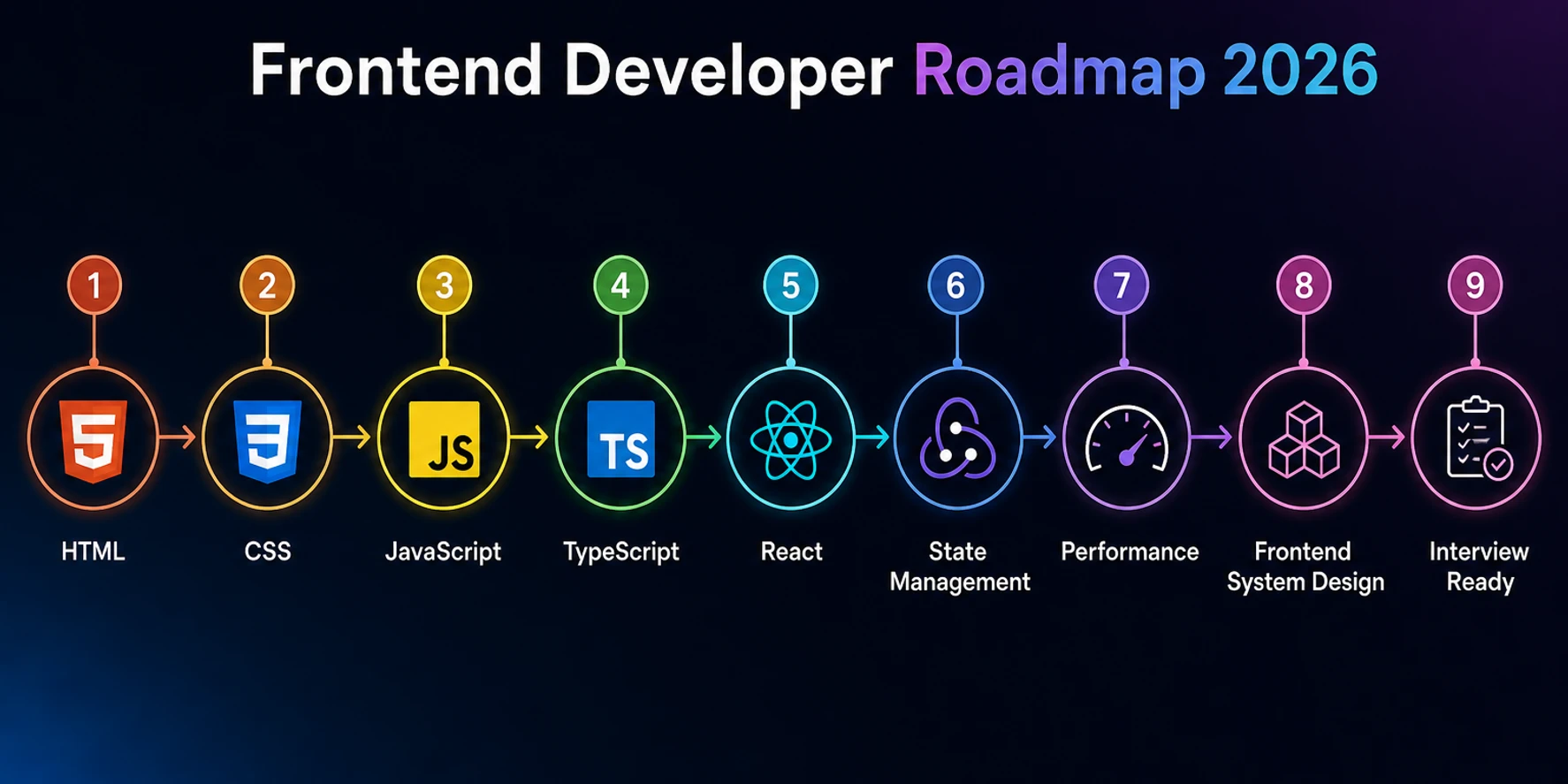
Drill fundamentals with our JavaScript topic questions and React topic questions.
Topic Importance for Frontend Developer Interviews
Interview panels do not weight topics equally. The chart below is an illustrative composite of product company and campus frontend rounds across India — use it to order revision, not to skip entire areas.
Illustrative topic importance (technical + behavioral rounds)
Deep-dive by skill area: HTML & CSS, TypeScript, and React.
React vs Angular vs Vue — Framework Comparison
Indian frontend loops overwhelmingly favor React, but enterprise employers still hire Angular specialists. Use this table to prioritize learning and to answer framework trade-off questions with context.
| Dimension | React | Angular | Vue |
|---|---|---|---|
| Learning Curve | Moderate — JSX + hooks; large ecosystem to navigate | Steep — TypeScript, RxJS, modules, and Angular CLI conventions | Moderate — approachable SFC syntax; composition API adds depth |
| Demand (India 2026) | Very High — dominant in startups and product companies | Medium–High — enterprise IT, banking, and large service accounts | Medium — growing share; strong in selective product teams |
| Interview Frequency | Highest — most FE loops assume React familiarity | Common in enterprise and Angular-heavy codebases | Less frequent than React; appears in Vue-first teams |
| Ecosystem | Largest — Next.js, state libs, UI kits, hiring pool | Mature — NgRx, Angular Material, enterprise patterns | Lean — Vue Router, Pinia, Nuxt; smaller but cohesive |
| Performance | Strong with code splitting, memoization, and SSR frameworks | Good with OnPush and lazy modules; heavier default bundle | Lightweight runtime; fine-grained reactivity aids efficiency |
| Enterprise Adoption | High — Meta lineage, widespread in Indian product firms | Very High — preferred in large regulated enterprises | Moderate — popular in APAC teams; less campus focus in India |
Common Frontend Interview Mistakes
These patterns cause rejections even when candidates know React syntax. Drill JavaScript fundamentals in mock interviews before your first real loop.
Mistake
Memorizing React APIs without JavaScript depth
Why it hurts: Candidates recite useEffect rules but fail on closures, event loop, or prototype questions — Round 1 eliminations happen on JS, not JSX syntax.
How to fix it: Spend 40% of prep on vanilla JavaScript: scope, async/await, promises, this binding, and array methods before advanced React patterns.
Mistake
Ignoring JS fundamentals
Why it hurts: Skipping typeof, coercion, and execution context leads to debugging failures in live coding and whiteboard trace questions.
How to fix it: Practice 20 fundamental MCQs weekly and explain answers aloud. Use strict equality and immutability habits in every code sample.
Mistake
Weak CSS knowledge
Why it hurts: Cannot build responsive layouts from scratch or explain specificity — interviewers assign UI tasks even for “React-only” roles.
How to fix it: Rebuild 3 layouts with Flexbox and Grid only. Memorize specificity order and practice mobile-first breakpoints without frameworks.
Mistake
No performance understanding
Why it hurts: Listing React.memo without profiling data, bundle analysis, or network waterfall reading signals shallow optimization knowledge.
How to fix it: Profile one real app with Lighthouse and React DevTools. Document one fix with before/after metrics for interview stories.
Mistake
No accessibility awareness
Why it hurts: Building clickable divs without keyboard support or ARIA labels fails product-company bars and senior frontend expectations.
How to fix it: Audit one page with axe or Lighthouse a11y. Practice semantic HTML, focus management, and aria-label on interactive components.
Mistake
No project depth
Why it hurts: Tutorial todo apps without architecture decisions, trade-offs, or deployment story cannot survive project discussion rounds.
How to fix it: Ship one portfolio project with README architecture section, API integration, error states, and one measurable improvement you drove.
30-Day Frontend Preparation Plan
A focused four-week plan balanced across HTML/CSS, JavaScript/TypeScript, React, and performance plus mock interviews. Pair Week 2 with our DSA topic map and follow the placement guide for campus timelines.
Week 1 (Days 1–7)
HTML + CSS
- Semantic HTML, forms, and accessibility basics
- Flexbox and CSS Grid layouts from scratch
- Responsive design — mobile-first, clamp(), media queries
- CSS specificity, cascade, and BEM or utility patterns
Week 2 (Days 8–14)
JavaScript + TypeScript
- Closures, scope, event loop, and promise chains
- ES6+ — destructuring, spread, modules, async/await
- TypeScript basics — interfaces, generics, union types
- DOM APIs, event delegation, and fetch error handling
Week 3 (Days 15–21)
React + State Management
- Components, props, state, hooks (useState, useEffect, useMemo)
- Controlled forms, lifting state, and composition patterns
- Context vs Redux/Zustand — when each fits
- Build one feature with API integration and loading states
Week 4 (Days 22–28)
Performance + System Design + Mock Interviews
- Code splitting, lazy loading, list virtualization overview
- Design a dashboard or component library on paper
- Browser internals — render pipeline, critical rendering path
- 3 timed mock interviews with spoken explanations
Practice beats passive reading
Run a full Frontend Developer mock interview — scored in 5 dimensions
Upload your resume and practice real frontend questions with AI-generated follow-ups. Get rubric-based feedback on communication clarity, technical depth, answer structure, confidence, and relevance — the same signals Indian panels evaluate.
- Resume-aware React, JavaScript, and behavioral questions
- Timed answers with filler-word analysis on voice mode
- Free credits to start — no card required
Related Interview Preparation Guides
Cross-train with role, topic, company, and blog guides — including React questions, Software Engineer hub, DSA topic map, and the placement guide.
Frontend Developers Interview Questions
10 curated · React & JavaScript · Updated 2026- 01
What is the difference between `==` and `===` in JavaScript?
TechnicalEasyView expert answer & prep guide
Expert answer: `==` compares values after type coercion, while `===` compares both value and type without coercion. In production frontend code, I default to `===` to avoid surprising conversions like `0 == "0"` or `"" == false`. I can still explain rare intentional uses of `==`, such as checking `null` and `undefined` together. In interviews, giving concrete coercion examples and stating a clear coding standard shows stronger JavaScript fundamentals than a one-line definition.
What interviewers evaluate: JavaScript type system fundamentals and whether you write predictable production code.
Answer strategy: Define both operators, give 2 coercion examples, state your team standard (`===` default), mention null-check exception.
Common mistakes: Saying they are interchangeable, or unable to explain any coercion example.
Follow-up questions:
- What is `Object.is` used for?
- How does `typeof null` behave?
- 02
What is the virtual DOM in React and why does it exist?
TechnicalEasyView expert answer & prep guide
Expert answer: Virtual DOM is React’s in-memory representation of UI structure. On state changes, React compares previous and new trees, then applies minimal updates to the real DOM. This model improves developer ergonomics and can reduce costly direct DOM mutations, especially in complex interfaces. I also mention that virtual DOM is not magic speed for every case—component design and rendering patterns still matter. In interviews, I connect reconciliation, keys, and render batching for a complete explanation.
What interviewers evaluate: React mental model depth beyond JSX syntax — reconciliation and update strategy.
Answer strategy: Define virtual DOM, explain diff-and-patch flow, mention keys and that performance still depends on component design.
Common mistakes: Claiming virtual DOM always makes React faster than vanilla JS, or skipping reconciliation entirely.
Follow-up questions:
- Why do list keys matter?
- What triggers a React re-render?
- 03
Explain CSS specificity. Which rule wins: an ID selector or a class selector?
TechnicalEasyView expert answer & prep guide
Expert answer: CSS specificity determines which rule wins when multiple rules target the same element. An ID selector has higher specificity than a class selector, so ID wins unless overridden by `!important` or inline styles in specific contexts. I explain specificity numerically and also mention source order as tiebreaker when specificity is equal. In frontend interviews, I pair this with maintainability advice: avoid overusing IDs and `!important`, and prefer predictable architecture like utility classes or scoped systems.
What interviewers evaluate: CSS debugging ability and whether you can explain cascade conflicts in real codebases.
Answer strategy: State ID beats class, explain specificity weights (inline > ID > class > element), add maintainability note.
Common mistakes: Wrong ordering, ignoring source order tiebreaker, or over-relying on `!important` in answers.
Follow-up questions:
- What beats an inline style?
- How do pseudo-classes affect specificity?
- 04
What is event bubbling in JavaScript? How do you stop it?
TechnicalMediumView expert answer & prep guide
Expert answer: Event bubbling means an event triggered on a child element propagates upward through ancestor elements. I stop propagation using `event.stopPropagation()` when parent handlers should not run. I also distinguish `preventDefault()`, which blocks default browser action but does not stop bubbling. In real apps, I use delegation intentionally for performance on large lists, then selectively stop bubbling for nested interactive controls. Interviewers usually check that you understand phases and practical handling choices.
What interviewers evaluate: DOM event model knowledge and practical handler design in interactive UIs.
Answer strategy: Define bubbling, show stopPropagation vs preventDefault, mention event delegation use case.
Common mistakes: Confusing preventDefault with stopPropagation, or not knowing capture vs bubble phases.
Follow-up questions:
- What is event capturing?
- When is event delegation useful?
- 05
What are the differences between `let`, `const`, and `var`?
TechnicalEasyView expert answer & prep guide
Expert answer: `var` is function-scoped and hoisted with undefined initialization, which can cause subtle bugs. `let` and `const` are block-scoped and respect temporal dead zone before declaration. `const` prevents reassignment of the binding but does not make objects deeply immutable. In modern JavaScript, I default to `const`, use `let` when reassignment is needed, and avoid `var` in new code. A strong interview answer includes scope examples and common loop-related pitfalls.
What interviewers evaluate: Core JavaScript scoping and hoisting — foundational for debugging async and closure bugs.
Answer strategy: Compare scope, hoisting, and reassignment rules; recommend const-first modern style with examples.
Common mistakes: Saying const makes objects immutable, or unable to explain temporal dead zone.
Follow-up questions:
- What is the temporal dead zone?
- How does hoisting affect function declarations?
- 06
What is the difference between controlled and uncontrolled components in React?
TechnicalMediumView expert answer & prep guide
Expert answer: Controlled components keep form state inside React using `value` and `onChange`, giving predictable validation and multi-step workflow control. Uncontrolled components rely on DOM state and refs, useful for simple fields or file inputs. In product UIs like Freshworks-style admin forms, controlled inputs are usually preferred for validation, analytics, and dynamic logic. I also mention not mixing both styles on the same field to avoid warnings and inconsistent behavior during rerenders.
What interviewers evaluate: Form state architecture judgment and React data-flow understanding.
Answer strategy: Contrast state ownership (React vs DOM), give when to use each, warn against mixing on same input.
Common mistakes: Treating all forms as uncontrolled, or not knowing file inputs often need refs.
Follow-up questions:
- How do you validate controlled form fields?
- When would you use react-hook-form?
- 07
How do you optimise the performance of a React application?
TechnicalHardView expert answer & prep guide
Expert answer: I start with profiling, not guesswork. Then I optimize high-impact areas: avoid unnecessary rerenders with memoization where proven useful, split heavy route bundles, virtualize long lists, and reduce expensive synchronous work on render paths. I also improve network and asset performance with lazy loading, caching strategy, and image optimization. In interviews, I present one before/after metric example because measurable impact is stronger than listing techniques without prioritization.
What interviewers evaluate: Performance engineering maturity — measurement-first optimization vs random memoization.
Answer strategy: Lead with profiling, prioritize bundle/network/render bottlenecks, cite one metric-driven fix.
Common mistakes: Sprinkling React.memo everywhere without profiling, or listing techniques with no prioritization.
Follow-up questions:
- When does useMemo hurt performance?
- How do you analyze bundle size?
- 08
How do you ensure cross-browser compatibility in your CSS and JavaScript?
TechnicalMediumView expert answer & prep guide
Expert answer: I use a layered approach: check feature support with caniuse data, transpile JavaScript with Babel targets, add CSS prefixes via Autoprefixer, and rely on progressive enhancement for advanced APIs. I test critical flows on Chrome, Firefox, Safari, and mobile browsers, with focused fallback paths for unsupported features. I prefer feature detection over user-agent sniffing. In product-company interviews, showing a repeatable compatibility process is more valuable than naming isolated browser quirks.
What interviewers evaluate: Production readiness and systematic QA habits for diverse browser environments.
Answer strategy: Describe toolchain (Babel, Autoprefixer), testing matrix, progressive enhancement, avoid UA sniffing.
Common mistakes: Only testing Chrome, or relying on polyfills without understanding bundle cost.
Follow-up questions:
- What is progressive enhancement?
- How do you test Safari-specific issues?
- 09
Tell me about a frontend component or feature you built that you are most proud of.
BehavioralMediumView expert answer & prep guide
Expert answer: I usually discuss a ticket-management table I built with server-side pagination, column filters, keyboard accessibility, and optimistic updates. The hardest part was balancing performance with UX for large datasets. I profiled render bottlenecks, introduced row virtualization, and reduced unnecessary rerenders through stable props and memoized selectors. As a result, interaction latency dropped and adoption improved among internal support agents. I conclude with one improvement area to show reflection, not just self-promotion.
What interviewers evaluate: Project ownership depth, technical trade-offs, and ability to communicate impact with specifics.
Answer strategy: Use STAR: situation, your technical decisions, measurable outcome, one lesson learned.
Common mistakes: Generic tutorial projects, no metrics, or claiming sole credit without explaining your role.
Follow-up questions:
- What would you refactor if you rebuilt it?
- How did you handle error states?
- 10
How would you approach building a fully responsive design from a desktop Figma mockup?
SituationalMediumView expert answer & prep guide
Expert answer: I do not shrink desktop blindly. I define core user tasks, then design mobile-first layouts with content-driven breakpoints. I use fluid spacing/type scales, Flexbox/Grid combinations, and responsive image strategy for performance. I verify edge states—long text, empty states, form errors, and localization. I also sync quickly with designers on ambiguous interactions before implementation drifts. In interviews, this workflow shows practical execution from design handoff to production-ready responsive behavior.
What interviewers evaluate: Design-to-code workflow, responsive CSS craft, and collaboration with designers.
Answer strategy: Mobile-first plan, content-driven breakpoints, layout primitives, edge-case checklist, designer sync.
Common mistakes: Fixed pixel breakpoints only, ignoring touch targets, or skipping empty/error states.
Follow-up questions:
- How do you handle responsive images?
- When do you use container queries?
Frequently Asked Questions
How many Frontend Developer interview questions should I prepare?
Aim for 40–60 core questions across JavaScript, React, CSS, HTML, TypeScript, and behavioral — but depth beats volume. Master 25 concepts you can explain with code examples and trade-offs rather than memorizing API lists.
Is React mandatory for Frontend Developer interviews in India?
React dominates product-company and startup loops in 2026, but enterprise firms still hire Angular developers. Learn React first for breadth, then skim Angular or Vue basics if you target specific employers.
How important is TypeScript for frontend interviews?
Increasingly expected at product companies. You should read and write basic interfaces, props typing, and union types even if your projects use JavaScript. Full generics mastery is rarely required for fresher loops.
Do Frontend Developer interviews include DSA?
Yes — usually easier than backend SWE loops. Expect arrays, strings, hashing, and occasional tree questions in OAs or live coding. Heavy DP is uncommon unless the role is labeled “frontend + algorithms.”
What CSS topics matter most in frontend interviews?
Flexbox, Grid, specificity, responsive design, box model, and positioning. Be ready to build a card layout or navbar from scratch without Tailwind during live exercises.
How do I prepare for frontend system design rounds?
Practice designing dashboards, infinite scroll feeds, autocomplete, and design systems. Cover component API design, state ownership, caching, error boundaries, and performance budgets — not microservices depth.
What is the typical Frontend Developer interview timeline in India?
Campus and service drives often complete in 2–4 weeks. Product company loops run 3–6 weeks from OA to offer, depending on panel scheduling and take-home assignments.
Should I learn Next.js for frontend interviews?
Helpful but not mandatory for all loops. Understand SSR vs CSR trade-offs, routing, and data fetching patterns. If your target companies list Next.js, build one deployed project with it.
How important is accessibility in frontend interviews?
Product companies increasingly test semantic HTML, keyboard navigation, and ARIA basics. Mention one accessibility improvement you shipped — it differentiates candidates with identical React knowledge.
What salary should I expect as a fresher Frontend Developer in India (2026)?
Service firms typically offer 3.5–7 LPA. Mid-tier product companies range 8–15 LPA. Strong off-campus product hires can exceed 15–22 LPA — confirm level, location, and ESOP separately.
How do I answer “Tell me about yourself” as a frontend fresher?
Use a 60–90 second arc: domain interest, one shipped UI project with tech stack, hardest technical problem solved, and why frontend engineering fits your strengths. End by mapping skills to the job description.
How should I use mock interviews for frontend prep?
Start after Week 2 of structured study. Run at least 3 mocks before real loops — mix JavaScript fundamentals, live UI coding, and one behavioral round. Review pacing, filler words, and whether you explained trade-offs aloud.