engineering · Fresher-friendly
Android Developer Interview Questions 2026
Curated Android developer interview questions with model answers, follow-ups, and prep tips — covering Kotlin, Jetpack Compose, MVVM, coroutines, and mobile system design for India 2026 hiring loops.
On this page
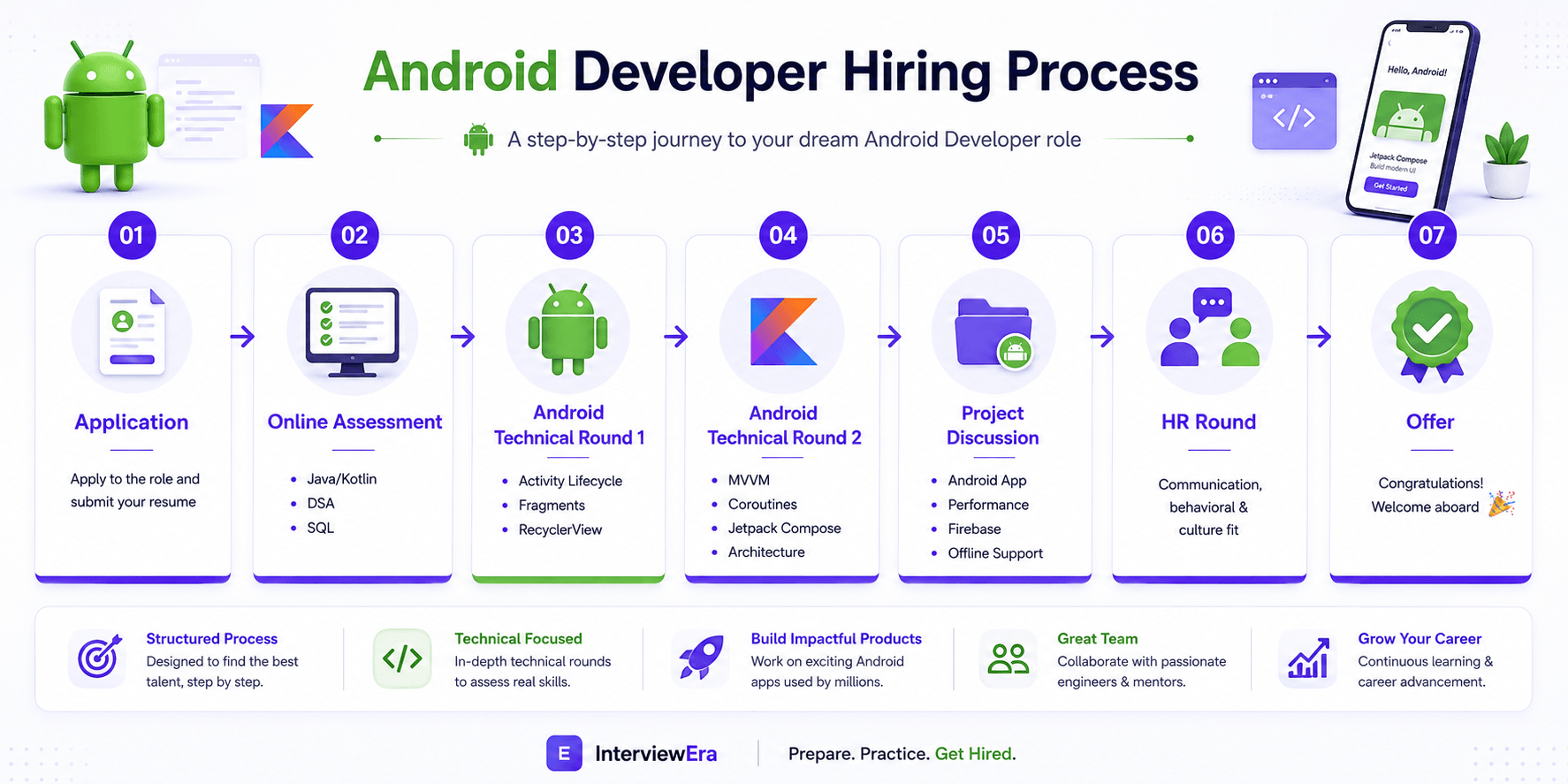
Android Hiring Process
Most Android Developer loops in India follow the sequence below — from application through online assessment, two technical rounds, project discussion, HR, and offer. Each stage tests a different signal.
Step 1 — Application
Recruiters scan for Kotlin/Android project depth, Play Store links or GitHub repos, and measurable impact (DAU, crash-free rate, performance). Tailor your resume to MVVM, Jetpack, and one shipped app you can demo live.
Step 2 — Online Assessment
Timed OA covering Java/Kotlin MCQs, DSA (arrays, strings, hash maps), and sometimes SQL or aptitude. Practice under 60–90 minute clocks — many Indian campus and lateral pipelines filter hard here.
Step 3 — Technical Round 1
Activity lifecycle, Fragments, RecyclerView, Intents, and basic architecture. Expect whiteboard or live coding on list screens, navigation, and lifecycle-aware components. Panels test fundamentals before frameworks.
Step 4 — Technical Round 2
MVVM, coroutines, Jetpack Compose, Room, Retrofit, and Clean Architecture trade-offs. Deeper than Round 1 — often includes “how would you refactor this screen?” and threading questions.
Step 5 — Project Discussion
Walk through your best Android app: architecture, offline strategy, API integration, performance fixes, and Firebase/analytics if used. Interviewers probe decisions, not slide decks.
Step 6 — HR round
Communication, teamwork, salary expectations, and notice period. Prepare “why Android,” cross-platform trade-offs (Flutter/RN), and a concise story about a production bug or release you owned.
Step 7 — Offer
Selected candidates receive compensation details and onboarding timelines. Android Developer packages in India typically range 6–18 LPA for 0–3 YOE at product/service mix — negotiate after level confirmation.
Android Roadmap
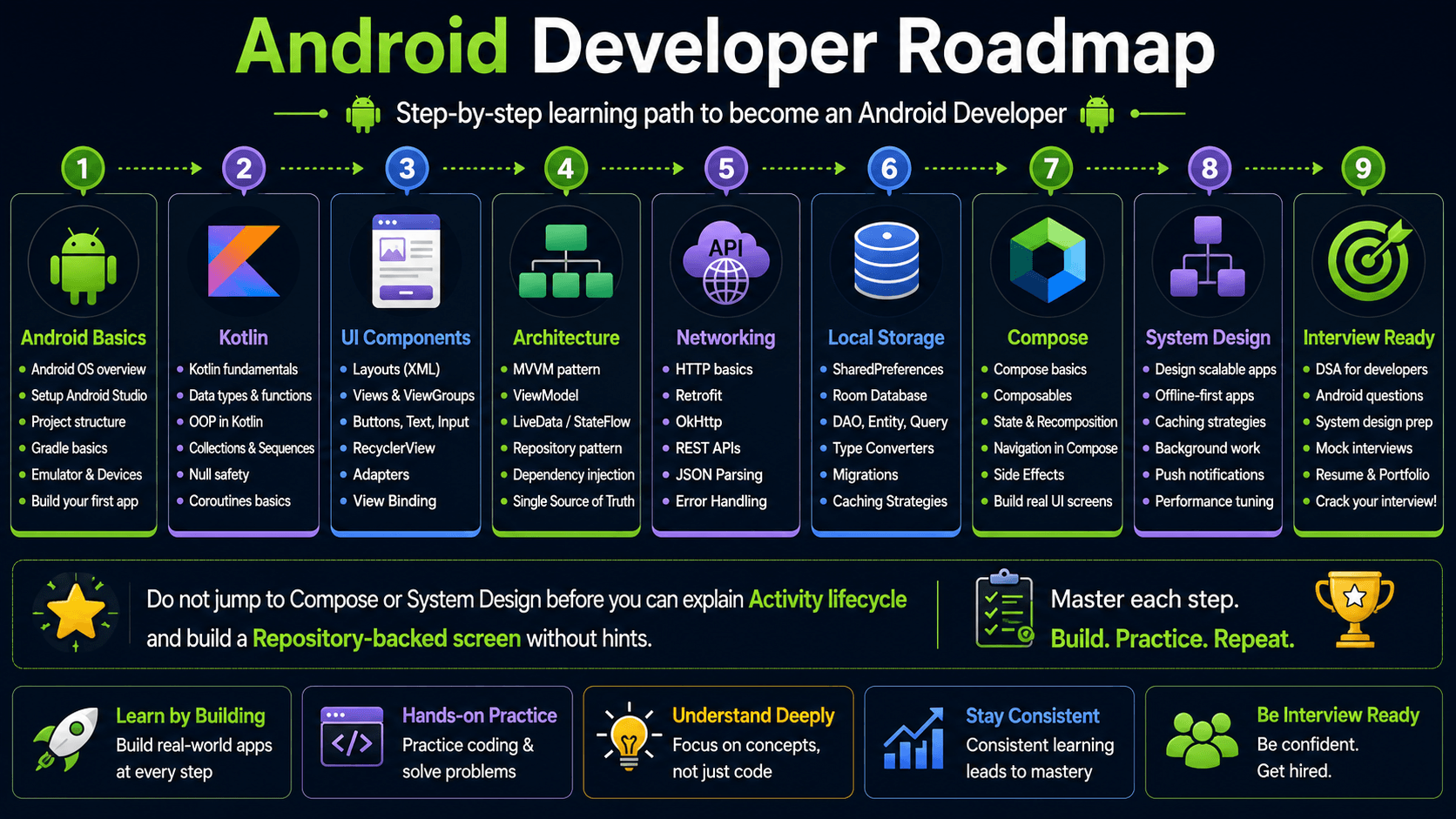
Step-by-step learning path from Android basics to interview readiness. Do not jump to Compose or system design before you can explain Activity lifecycle and build a Repository-backed screen without hints.
Android Fundamentals
Technical Round 1 filters on platform fundamentals before Jetpack depth. Panels expect manifest-aware answers and real component trade-offs.
Four app components
What interviewers evaluate: Activity, Service, BroadcastReceiver, ContentProvider — when to use each and how they are declared in AndroidManifest.xml.
Common mistakes: Treating every background task as a Service, or unable to explain ContentProvider use cases beyond “database sharing.”
Preparation tips: Map each component to one real app scenario: Activity for screens, Service for music playback, Receiver for boot/connectivity, Provider for contact sync.
Application class & manifest
What interviewers evaluate: Global initialization, permission declarations, intent filters, and multi-module manifest merging basics.
Common mistakes: Putting heavy work in Application.onCreate without lazy init, or missing exported flag on components for Android 12+.
Preparation tips: Review manifest merge conflicts in multi-module apps. Know dangerous permissions vs normal permissions.
Context & resources
What interviewers evaluate: Application vs Activity context, memory leak patterns, configuration qualifiers, and themes/styles.
Common mistakes: Long-lived references to Activity context, or hardcoding strings/dimensions instead of resources.
Preparation tips: Use applicationContext for singletons. Explain why leaking Activity context causes OOM on rotation.
Permissions model
What interviewers evaluate: Runtime permissions (API 23+), special permissions, and backward-compatible permission flows.
Common mistakes: Assuming manifest-only permissions work on Android 6+, or not handling “don’t ask again” UX.
Preparation tips: Practice location/camera permission flow with ActivityResultContracts. Mention shouldShowRequestPermissionRationale.
Activity Lifecycle
Lifecycle questions appear in nearly every Android interview. Narrate callbacks in order and tie each to what you save, start, or release.
onCreate
Initialize UI, bind ViewModel, set content. One-time setup — avoid heavy I/O on main thread.
onStart / onResume
Activity visible and interactive. Start animations, register listeners, refresh data.
onPause
Partially obscured — save lightweight state, pause video, release camera if needed.
onStop
Fully hidden. Unregister listeners that are not needed in background.
onDestroy
Final cleanup. Distinguish config change vs finishing — ViewModel survives rotation, Activity may not.
Jetpack Components
Modern Android interviews assume Jetpack literacy — ViewModel, Room, Navigation, and background work patterns.
ViewModel
What interviewers evaluate: Survives configuration changes, holds UI state, exposes StateFlow/LiveData, scoped to ViewModelStoreOwner.
Common mistakes: Storing Activity/View references in ViewModel, or putting Android framework APIs directly in ViewModel.
Preparation tips: Inject Repository via constructor. Use viewModelScope for coroutines. Explain why ViewModel outlives rotation.
Room
What interviewers evaluate: Entity, DAO, Database, migrations, and compile-time SQL validation with Flow return types.
Common mistakes: Main-thread database access, or schema changes without migration strategy.
Preparation tips: Show one DAO with @Query Flow and suspend insert. Mention TypeConverters for complex types.
Navigation Component
What interviewers evaluate: NavGraph, Safe Args, deep links, and single-Activity multi-Fragment architecture.
Common mistakes: Manual FragmentTransaction backstack bugs, or passing non-parcelable complex objects via bundles.
Preparation tips: Prefer typed Safe Args. Explain popUpTo and inclusive for login → home flows.
WorkManager
What interviewers evaluate: Deferrable background work with constraints (network, charging) vs foreground Service for user-visible tasks.
Common mistakes: Using WorkManager for immediate UI-critical tasks, or Services for deferrable sync.
Preparation tips: Contrast WorkManager with coroutines + Repository for in-app sync. Know when Foreground Service is required.
DataStore
What interviewers evaluate: Preferences DataStore vs Proto DataStore as SharedPreferences replacement with coroutine APIs.
Common mistakes: Still using SharedPreferences on new projects without migration plan.
Preparation tips: Mention atomic updates and type safety. Pair with Repository for settings layer.
Drill with Android topic questions and Java developer questions.
Kotlin Interview Questions
Kotlin idioms separate strong Android candidates from Java-translators. Master these five areas with code snippets you can write on a whiteboard.
Data classes
What interviewers evaluate: Auto-generated equals/hashCode/copy, component functions, and immutability for UI state models.
Common mistakes: Mutable var properties in state models, or using data class for classes with inheritance needs.
Preparation tips: Use copy() for state updates in ViewModel. Contrast with regular classes for sealed hierarchies.
Sealed classes
What interviewers evaluate: Exhaustive when expressions for UI state (Loading/Success/Error) and network result wrappers.
Common mistakes: Using enum for states that carry payload data, or forgetting sealed interface for modular modules.
Preparation tips: Model ApiResult as sealed class. Show compiler-enforced exhaustive when in UI layer.
Extension functions
What interviewers evaluate: Adding behavior without inheritance — View binding helpers, String validation, Context utilities.
Common mistakes: Extension abuse creating god-util files, or extensions that should be member functions.
Preparation tips: Keep extensions scoped by file/package. Explain they are static dispatch, not true polymorphism.
Scope functions
What interviewers evaluate: let, run, with, apply, also — choosing the right one for null checks, configuration, and side effects.
Common mistakes: Nesting five scope functions unreadably, or using apply when let is clearer for transformations.
Preparation tips: Memorize: apply/also return context; let/run/with return lambda result. Use table in interviews.
Collections
What interviewers evaluate: map/filter/reduce, sequences for lazy chains, groupBy, and immutable vs mutable collection choices.
Common mistakes: Imperative loops where functional chains are clearer, or O(n²) filter-in-loop patterns.
Preparation tips: Practice transforming API DTO lists to UI models with map + filter. Mention sequence for large datasets.
Also review Java developer interview questions for OOP overlap and Java topic questions.
Coroutines
Coroutines are standard in Kotlin Android codebases. Technical Round 2 often traces a network call from ViewModel through Dispatchers to UI state.
launch
What interviewers evaluate: Fire-and-forget coroutine in a scope — viewModelScope, lifecycleScope — with structured cancellation.
Common mistakes: GlobalScope.launch in production, or launch without exception handler for UI-critical work.
Preparation tips: Always tie to a scope that cancels on clear. Show try/catch or supervisorScope for parallel tasks.
async
What interviewers evaluate: Deferred results, parallel API calls with async/await pattern, and combining results.
Common mistakes: Sequential await of independent calls, or async without structured concurrency parent.
Preparation tips: Fetch profile + settings in parallel with async/await. Explain lazy start until await.
suspend
What interviewers evaluate: Suspending functions, continuation passing, and why they do not block threads.
Common mistakes: Calling suspend functions from non-coroutine context, or blocking with runBlocking on Main.
Preparation tips: Trace one Retrofit suspend call from ViewModel through Dispatcher.IO to Main state update.
Dispatchers
What interviewers evaluate: Main, IO, Default, Unconfined — choosing dispatcher for UI, network, CPU work.
Common mistakes: Network on Main, or heavy JSON parsing on Main inside collect.
Preparation tips: Rule: UI on Main, I/O on IO, sorting on Default. Mention withContext for switching.
Structured concurrency
What interviewers evaluate: Parent-child job hierarchy, cancellation propagation, supervisorJob, and coroutineScope vs supervisorScope.
Common mistakes: Orphan coroutines after ViewModel cleared, or catching CancellationException incorrectly.
Preparation tips: Explain viewModelScope cancels all children on onCleared. Never swallow CancellationException.
See also Android architecture flow for where coroutines live in ViewModel and Repository layers.
Android Architecture Flow
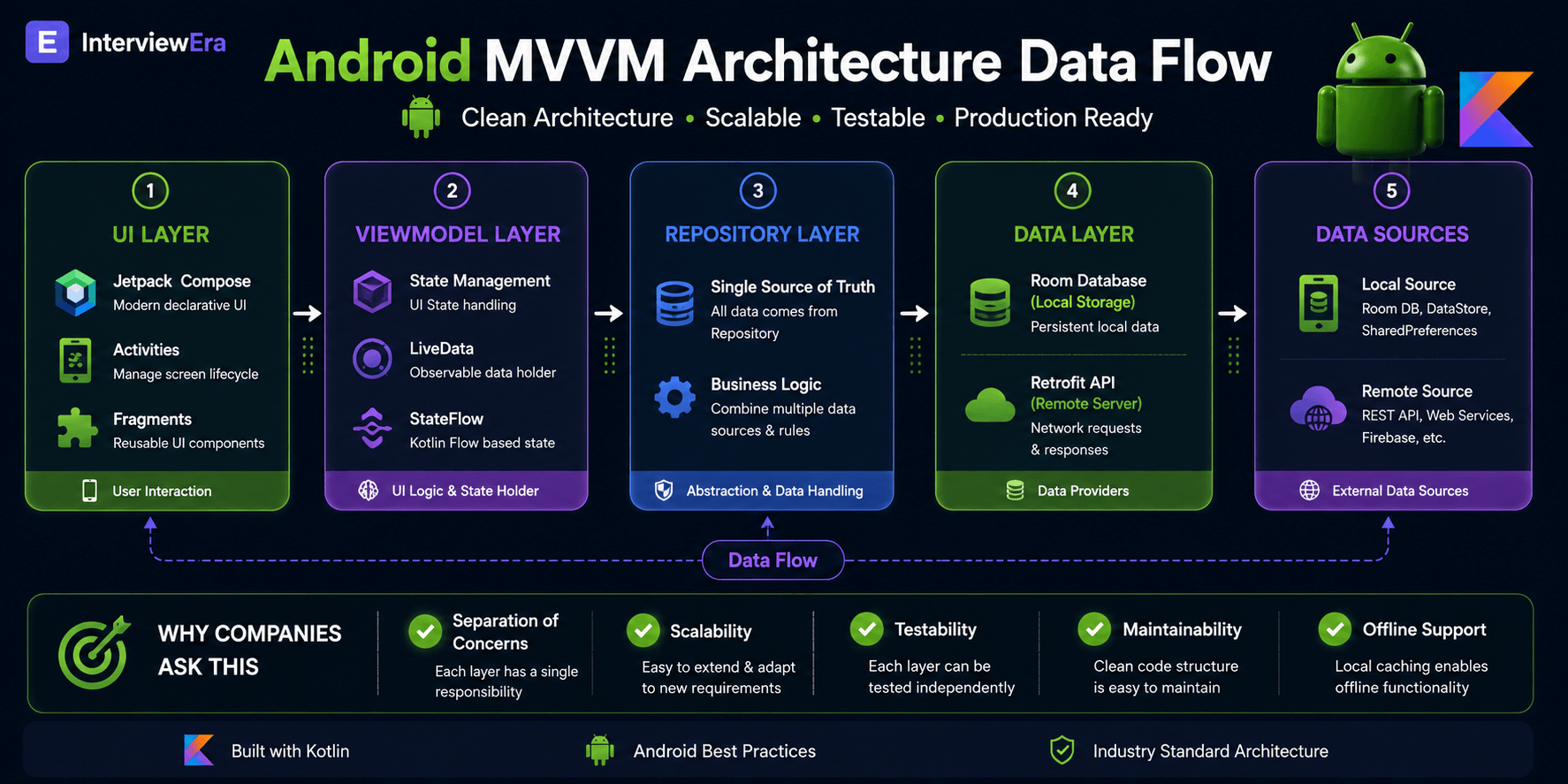
Interviewers expect you to trace data flow from UI click to remote API and back. Draw this stack when asked “explain your app architecture” — it is the standard MVVM + Repository pattern on modern Android teams.
Separation of concerns
UI renders state and forwards events — no business logic in Activity or Composable. ViewModel holds presentation logic and survives rotation. Repository owns data orchestration (cache vs network). Data sources (Room DAO, Retrofit service) know nothing about UI.
Scalability
Feature modules, clear Repository contracts, and unidirectional data flow let teams ship in parallel. New screens reuse existing Repositories; API changes stay isolated behind data-layer interfaces. Compose and Navigation scale to large apps when state is hoisted correctly.
Testability
ViewModels unit-test without Robolectric by faking Repository. Repositories test with in-memory Room or mock web servers. UI tests (Espresso / Compose Test) verify critical flows only — not every branch. DI (Hilt) makes swapping fakes trivial in tests.
Pair with backend developer questions for API design context and REST API questions for networking depth.
Jetpack Compose
Compose adoption is accelerating at product companies. Even XML-heavy portfolios should cover recomposition, state, and side effects.
Recomposition
What interviewers evaluate: When Compose re-runs composables, stability, and skipping unchanged subtrees.
Common mistakes: Creating unstable lambdas/objects in composition causing full recompose storms.
Preparation tips: Use remember and stable keys. Explain compiler skipping vs forced recomposition.
State
What interviewers evaluate: State<T>, mutableStateOf, state hoisting, and unidirectional data flow with ViewModel.
Common mistakes: Mutable state in composable without remember, or duplicating ViewModel state locally.
Preparation tips: Hoist state to ViewModel for business logic; keep ephemeral UI state (scroll) local with rememberSaveable.
remember
What interviewers evaluate: remember, rememberSaveable, derivedStateOf, and caching expensive calculations across recompositions.
Common mistakes: Heavy work in composable body without remember, or rememberSaveable for non-Saver types.
Preparation tips: Pair remember with keys for list items. Use derivedStateOf for computed filter state.
Navigation
What interviewers evaluate: Compose Navigation, typed routes, nested graphs, and passing arguments safely.
Common mistakes: Stringly-typed routes without arguments validation, or storing NavController in ViewModel.
Preparation tips: Compare single-Activity Compose nav vs Fragment Navigation. Mention deep link handling.
Side effects
What interviewers evaluate: LaunchedEffect, DisposableEffect, SideEffect, and rememberCoroutineScope for event-driven work.
Common mistakes: LaunchedEffect without proper keys causing restart loops, or collecting Flow without lifecycle awareness.
Preparation tips: Use collectAsStateWithLifecycle for Flow. LaunchedEffect(Unit) for one-shot API load.
Android System Design
Mobile system design focuses on offline UX, sync, modularization, and API boundaries — lighter than backend design but tests architectural thinking. Practice these three prompts.
Chat App
Real-time messaging, message ordering, offline queue, read receipts, media upload, and push notifications via FCM.
- WebSocket or Firebase Realtime Database vs REST polling trade-offs.
- Local Room cache with optimistic UI and sync conflict resolution.
- Pagination for chat history and image compression before upload.
Offline Notes App
CRUD with Room, sync when online, conflict merging, and search across local database.
- Single source of truth in Repository — Room as cache, remote as authority.
- WorkManager for background sync with network constraints.
- Full-text search with FTS or in-memory index for small datasets.
Food Delivery App
Restaurant listing, cart, order tracking, maps, and payment flow with multiple API dependencies.
- Modular features: catalog, cart, orders — clean module boundaries.
- Live order tracking with polling vs push; map SDK integration.
- Handle payment WebView/ SDK and idempotent order submission.
Cross-train with system design interview questions and DSA preparation.
Android Project Discussion
Project rounds open with “walk me through your app.” Prepare a 3-minute demo covering architecture, API integration, offline behaviour, Firebase usage if any, and one performance or testing win with metrics.
Architecture decisions
What to cover: Why MVVM or MVI, single-Activity vs multi-Activity, module boundaries, dependency injection (Hilt/Koin), and unidirectional data flow.
Example interviewer questions:
- Walk me through your app architecture from UI to data layer.
- Why did you choose MVVM over MVI for this project?
- How would you add a new feature without touching unrelated modules?
API integration
What to cover: Retrofit setup, interceptors, auth headers, error mapping, pagination, and retry with exponential backoff.
Example interviewer questions:
- How did you structure Retrofit services and DTO mapping?
- How do you handle 401 token refresh without duplicating calls?
- What happens if the user navigates away mid-request?
Offline support
What to cover: Room as single source of truth, cache-first Repository, sync on reconnect, conflict resolution, and user-visible offline states.
Example interviewer questions:
- How does your app behave without network?
- Describe your cache invalidation and refresh strategy.
- Tell me about a sync bug you fixed and the root cause.
Firebase
What to cover: Auth, Firestore/Realtime Database, Cloud Storage, Analytics, Crashlytics, and Remote Config — when to use each vs custom backend.
Example interviewer questions:
- Which Firebase products did you use and why not a custom API?
- How do you secure Firestore rules for user-scoped data?
- How did Crashlytics help you fix a production issue?
Push notifications
What to cover: FCM token lifecycle, notification channels (Android 8+), deep links from notifications, and background vs foreground handling.
Example interviewer questions:
- How do you register and refresh FCM tokens?
- How does the user land on the correct screen from a notification tap?
- How do you handle data-only vs notification payloads?
Performance optimization
What to cover: Cold start, Baseline Profiles, RecyclerView/Compose list performance, memory leaks, ANR prevention, and Play Console vitals.
Example interviewer questions:
- What was your cold start time and how did you improve it?
- How did you fix a memory leak or ANR in production?
- What do Play Console vitals tell you about your release?
Testing
What to cover: Unit tests for ViewModel/Repository, fake implementations, UI tests for critical flows, and what you deliberately do not test.
Example interviewer questions:
- What is your testing pyramid for this app?
- How do you test a ViewModel that calls a Repository?
- Which flows have Espresso or Compose UI tests and why those?
Resume Examples
Recruiters and panels scan for measurable Android impact — crash rates, startup time, installs, and architecture depth. Replace vague bullets with numbers.
Performance impact
Weak resume bullet: “Built Android app with Kotlin.”
Strong resume bullet: “Reduced cold start time 38% (2.1s → 1.3s) by lazy-init in Application, R8 optimization, and Baseline Profile — Play Console vitals crash-free rate 99.2%.”
Architecture depth
Weak resume bullet: “Used MVVM in Android project.”
Strong resume bullet: “Shipped Kotlin MVVM app with Hilt, Room offline cache, and Retrofit — 50k+ installs; refactored monolithic Activity to single-Activity Navigation + 12 Fragments.”
Compose migration
Weak resume bullet: “Learned Jetpack Compose.”
Strong resume bullet: “Migrated checkout flow from XML to Jetpack Compose — cut screen code 40%, improved conversion 12% A/B test; state hoisted to ViewModel with StateFlow.”
Measurable delivery
Weak resume bullet: “Worked on REST API integration.”
Strong resume bullet: “Integrated 8 REST endpoints with Retrofit + coroutines; implemented exponential backoff retry — API failure rate dropped from 4.1% to 0.8% over 3 releases.”
Preparation Roadmap
Four-week plan balancing fundamentals, architecture, Compose, and mock interviews — aligned with typical India Android hiring loops.
Week 1
Android fundamentals + Kotlin
- Activity lifecycle, Intents, permissions — draw lifecycle diagram from memory.
- Kotlin: data/sealed classes, scope functions, collections — 10 snippet exercises.
- Build one screen: RecyclerView list + detail navigation.
- Review four app components with manifest examples.
Week 2
Architecture + Jetpack
- MVVM + Repository pattern with ViewModel and StateFlow.
- Room + Retrofit end-to-end — cache-first Repository.
- Hilt or manual DI — inject Repository into ViewModel.
- WorkManager or coroutine sync for background refresh.
Week 3
Coroutines + Compose
- Coroutines: launch, async, Dispatchers, structured concurrency drills.
- Jetpack Compose: state hoisting, remember, LaunchedEffect, Navigation.
- Migrate one XML screen to Compose or build new feature in Compose.
- System design outlines: chat app + offline notes (whiteboard 30 min each).
Week 4
Mocks + project polish
- Expand project walkthrough — architecture, offline, metrics, Play Store link.
- 2 timed mock technical rounds (lifecycle + MVVM deep dive).
- Polish resume bullets with numbers; prepare 12 expanded question answers.
- HR prep: salary research, cross-platform opinion, notice period story.
Run full-loop practice on InterviewEra mock interviews or drill with the Android question generator.
Related Interview Preparation Guides
Cross-train with role, topic, and company question banks — including frontend, backend, SQL, and Kotlin sections on this guide.
Android Developer Interview Questions with Answers
12 curated · Kotlin & Jetpack · Updated 2026- 01
What are the four main components of an Android application?
TechnicalEasyView expert answer & prep guide
Expert answer: The four main Android components are Activity, Service, BroadcastReceiver, and ContentProvider. Activity handles UI screens, Service handles background tasks, BroadcastReceiver listens to system or app broadcasts, and ContentProvider exposes structured data between apps. I usually add one practical mapping: music playback via foreground service, push or connectivity events via receiver, and contacts-style data sharing via provider. Interviewers look for real usage clarity, not just memorized names from Android docs.
What interviewers evaluate: Whether you can map each component to real scenarios and explain manifest registration — not just list names.
Answer strategy: Name all four, give one-line purpose each, then pick one scenario (“music playback → Service”) and explain why others do not fit.
Common mistakes: Listing components without manifest context, or confusing Service with WorkManager use cases.
Follow-up questions:
- When would you use WorkManager instead of a Service?
- What is an exported component and why does it matter on Android 12+?
- 02
Explain the Android Activity lifecycle. When is onStop called vs onPause?
TechnicalEasyView expert answer & prep guide
Expert answer: Activity lifecycle reflects visibility changes. `onPause()` is called when activity loses focus but may remain partially visible, like a dialog overlay. `onStop()` runs when activity is fully hidden. I keep lightweight state updates in pause and release heavier listeners/resources in stop. For configuration changes, I rely on ViewModel and saved state patterns instead of heavy recreation logic. In interviews, drawing lifecycle order and giving one real scenario is more convincing than reciting callback names.
What interviewers evaluate: Lifecycle ordering, config changes vs finishing, and where to persist state.
Answer strategy: Draw the diagram. Contrast dialog overlay (onPause only) vs new Activity covering yours (onPause + onStop). Mention ViewModel vs onSaveInstanceState.
Common mistakes: Saving large objects in onSaveInstanceState, or doing heavy work in onCreate on every rotation.
Follow-up questions:
- What happens to your Activity on low memory kill?
- How does Process Death differ from rotation?
- 03
What is the difference between Fragment and Activity?
TechnicalEasyView expert answer & prep guide
Expert answer: Activity is the top-level screen host, while Fragment is a modular, reusable UI component inside an activity. Fragments help build adaptive layouts and cleaner separation for large screens and navigation flows. In modern Android apps, single-activity architecture with multiple fragments remains common, especially with Navigation Component. I explain lifecycle relationship too: fragment lifecycle is tied to host activity but has its own view lifecycle. This demonstrates architectural understanding beyond basic definitions.
What interviewers evaluate: Modular UI reasoning and single-Activity architecture familiarity.
Answer strategy: Define both, explain host relationship, mention tablet dual-pane vs phone single-pane, and Navigation back stack.
Common mistakes: Saying Fragments are “deprecated” because of Compose — they remain central in many codebases.
Follow-up questions:
- What is a Fragment lifecycle relative to Activity?
- When would you choose single-Activity architecture?
- 04
What are Jetpack components? Name and explain three commonly used ones.
TechnicalMediumView expert answer & prep guide
Expert answer: Jetpack is a suite of Android libraries for robust architecture and lifecycle-safe development. Three common components I use are ViewModel, Room, and Navigation. ViewModel stores UI state across configuration changes, Room provides typed local persistence with DAO abstraction, and Navigation manages back stack and screen transitions safely. I also mention where each fits in MVVM flow. Interviewers prefer this problem-solution framing over listing many Jetpack names without implementation context.
What interviewers evaluate: Production familiarity with modern Android stack beyond Activities and XML.
Answer strategy: Pick ViewModel + Room + Navigation. For each: problem it solves, one API, one pitfall.
Common mistakes: Naming libraries without explaining lifecycle or threading integration.
Follow-up questions:
- ViewModel vs AndroidViewModel?
- Room vs SQLiteOpenHelper — why migrate?
- 05
What are Kotlin coroutines? How do they differ from threads?
TechnicalMediumView expert answer & prep guide
Expert answer: Coroutines are lightweight concurrency units that can suspend without blocking underlying threads. Threads are OS-level resources with higher creation and context-switch overhead. In Android, I use coroutines with `viewModelScope` to run network/database operations on appropriate dispatchers and update UI safely on main thread. Coroutines support structured concurrency, making cancellation and lifecycle handling cleaner than ad-hoc thread management. This distinction is frequently tested in product-company Android interviews.
What interviewers evaluate: Structured concurrency basics and dispatcher choice for Android workloads.
Answer strategy: Contrast thread cost vs coroutine scheduling. Trace one network call: launch → withContext(IO) → Main state update.
Common mistakes: Using GlobalScope, or blocking Main with runBlocking.
Follow-up questions:
- Explain async vs launch.
- What happens when viewModelScope is cancelled?
- 06
What is RecyclerView? How does the ViewHolder pattern improve performance?
TechnicalMediumView expert answer & prep guide
Expert answer: RecyclerView efficiently displays large lists by reusing item views instead of inflating new views for every row. ViewHolder caches item view references, reducing repetitive view lookups during scroll. Combined with DiffUtil and proper adapter updates, this significantly improves scroll performance and battery efficiency on mid-range Android devices common in India. In interviews, I explain recycling pool behavior and why `notifyDataSetChanged()` should be avoided for small updates when granular diff-based updates are possible.
What interviewers evaluate: List UI performance intuition — still common in legacy and hybrid codebases.
Answer strategy: Explain recycling pool, ViewHolder role, DiffUtil for efficient updates, and stable IDs if asked.
Common mistakes: Calling notifyDataSetChanged for every small change instead of DiffUtil.
Follow-up questions:
- DiffUtil vs notifyItemRangeChanged?
- How would you paginate with Paging 3?
- 07
Tell me about the Android app you are most proud of. What was the hardest technical problem you solved?
BehavioralMediumView expert answer & prep guide
Expert answer: I describe a Kotlin MVVM app where the toughest challenge was reliable offline-first behavior. The issue was sync conflicts when users updated data offline and reconnected. I redesigned repository flow with local Room as source of truth, queued sync operations, and conflict resolution rules by timestamp/version. This reduced sync-related errors and improved user trust in weak-network conditions. I end with what I would improve next, such as better telemetry on failed merges and retry visibility.
What interviewers evaluate: Ownership, depth, and reflection — not resume recitation.
Answer strategy: 2-minute story: problem → constraints → architecture decision → result metric → one lesson learned.
Common mistakes: Team-only stories with no “I,” or no numbers/outcome.
Follow-up questions:
- What would you refactor today?
- How did you test that fix?
- 08
Your app crashes on Android 6 but works fine on Android 12. How do you debug?
SituationalHardView expert answer & prep guide
Expert answer: I reproduce on an API 23 emulator first, then read full stack trace and device logs before changing code. Common root causes are runtime permission handling, API level incompatibilities, and missing version guards around newer APIs. I verify manifest and behavior differences, add compatibility checks, and run regression across minSdk-targeted matrix. After fix, I monitor crash dashboards by API level to confirm recovery. A systematic reproduce-isolate-validate flow matters more than guessing device-specific patches.
What interviewers evaluate: Systematic debugging across API levels — common in India’s fragmented device market.
Answer strategy: Reproduce on API 23 emulator → read stack trace → check permissions → check Build.VERSION guards → Play Console vitals.
Common mistakes: Blaming “old Android” without reading stack trace or testing on matching API emulator.
Follow-up questions:
- How do you test backward compatibility in CI?
- What is AndroidX and why use it?
- 09
How do you ensure backward compatibility in your Android apps?
TechnicalMediumView expert answer & prep guide
Expert answer: I design with compatibility in mind: AndroidX libraries, API-level checks, feature gating with `Build.VERSION`, and careful deprecation handling. I maintain a test matrix across key API levels and vendor devices, because Indian users run diverse hardware/software combinations. I avoid assuming latest-platform behavior and validate permissions, storage, and background task behavior on older versions. In interviews, I mention both code-level guards and release-process discipline to show practical ownership of compatibility.
What interviewers evaluate: Release discipline for diverse OEM/API mix in India.
Answer strategy: Cover AndroidX backports, lint @RequiresApi, compatibility library versions, and Firebase/Test Lab matrix.
Common mistakes: Targeting latest SDK only in dev without minSdk emulator testing.
Follow-up questions:
- How do you handle deprecated APIs?
- What is desugaring?
- 10
What is onSaveInstanceState? When is it called and what should you save in it?
TechnicalMediumView expert answer & prep guide
Expert answer: `onSaveInstanceState` is used to persist small UI state before an activity may be destroyed, such as during rotation or process recreation. I save lightweight values like selected tab, form text, or scroll position—not large objects or full datasets. For business state, I rely on ViewModel and persistent storage. I also mention `SavedStateHandle` in ViewModel for cleaner restoration patterns. Interviewers usually check whether you understand state boundaries rather than dumping everything into Bundle.
What interviewers evaluate: State restoration strategy across rotation and process death.
Answer strategy: Contrast ViewModel (survives rotation) vs saved state (process death). Give examples of what belongs in each.
Common mistakes: Putting bitmaps or large lists in Bundle.
Follow-up questions:
- SavedStateHandle in ViewModel?
- How does Compose rememberSaveable relate?
- 11
What is the difference between Intent and PendingIntent?
TechnicalMediumView expert answer & prep guide
Expert answer: Intent is an immediate message to start an activity, service, or broadcast now. PendingIntent is a token granting another component or system app permission to execute that intent later on your app’s behalf, common in notifications and alarms. I also mention modern security requirements like immutable flags where appropriate. In interviews, I connect this to practical scenarios: notification tap actions, alarm triggers, and controlled deferred execution under Android background restrictions.
What interviewers evaluate: Component communication and system integration patterns.
Answer strategy: Define both, give notification action example, mention immutable PendingIntent flag on Android 12+.
Common mistakes: Using explicit Intent where PendingIntent is required for background start restrictions.
Follow-up questions:
- Implicit vs explicit Intent?
- Deep links with App Links?
- 12
Native Android vs Flutter vs React Native — which do you prefer for a new project and why?
HREasyView expert answer & prep guide
Expert answer: I choose based on product goals, team strengths, and platform constraints. For performance-sensitive Android features, deep platform API integration, and long-term Android hiring depth in India, native Kotlin is often my first choice. Flutter or React Native make sense when one team must ship both platforms quickly with acceptable trade-offs. I avoid ideological answers and explain criteria: performance, hiring, plugin maturity, maintenance cost, and timeline. Interviewers value this contextual trade-off reasoning.
What interviewers evaluate: Pragmatic trade-off thinking without fanboy answers.
Answer strategy: State criteria: team skills, performance needs, SDK access, time-to-market. Pick one with justified context.
Common mistakes: Dismissive “Flutter is always better” without nuance.
Follow-up questions:
- When would you embed Flutter in existing native app?
- Kotlin Multiplatform opinion?
Frequently Asked Questions
What are the most common Android developer interview questions?
Panels typically ask Activity lifecycle, Kotlin fundamentals, MVVM or Clean Architecture, coroutines vs threads, Jetpack Compose basics, Room/Retrofit integration, and a project or system design walkthrough. This guide lists curated questions with model answers, follow-ups, and mistakes to avoid.
How many rounds are in a typical Android Developer interview in India?
Most loops have 4–6 stages after resume screening: online assessment, 1–2 technical Android rounds, project discussion, and HR. Product companies may add a system design or architecture round; service firms often emphasize OA DSA and Core Java/Kotlin.
Is Kotlin mandatory for Android interviews in 2026?
Kotlin is the default for new Android development and most panels expect Kotlin-first answers. Java knowledge still helps for legacy codebases and OA MCQs, but lead with Kotlin idioms, coroutines, and Jetpack in technical rounds.
Do I need Jetpack Compose for Android interviews?
Compose is increasingly asked at product companies and startups. You should understand recomposition, state hoisting, and Navigation even if your portfolio is XML-based — mention migration plans or hybrid screens if asked.
How much DSA is required for Android Developer roles?
OA rounds often test arrays, strings, hash maps, and easy–medium LeetCode. Technical rounds focus more on Android, Kotlin, and architecture, but strong DSA helps at Amazon, Flipkart, and Microsoft mobile-adjacent loops.
What Android projects should I put on my resume?
One polished app beats five tutorials. Include Play Store or GitHub link, architecture (MVVM), offline/Room, REST integration, and one metric: installs, crash-free rate, or performance improvement.
How do I prepare for Android system design interviews?
Practice whiteboarding chat, offline notes, and food delivery apps. Cover API design, local cache, sync, push notifications, modularization, and scalability — mobile system design is lighter than backend but tests data flow and offline UX.
What is the salary range for Android Developers in India in 2026?
Freshers typically see 4–8 LPA at service firms and 8–14 LPA at product companies. With 2–4 years, product roles often reach 12–22 LPA depending on city, company, and Compose/architecture depth.
Should I learn MVVM or MVI for interviews?
MVVM is the most common interview expectation — ViewModel, Repository, StateFlow/LiveData. MVI is a plus at some product companies. Know unidirectional data flow in either pattern.
How important are coroutines compared to RxJava?
Coroutines are the modern default in Kotlin Android codebases. Understand launch, async, suspend, Dispatchers, and cancellation. RxJava may appear in legacy apps — mention interoperability if you have seen it.
What should I demo in the project discussion round?
Open your app live, walk architecture diagram (UI → ViewModel → Repository → Room/Retrofit), explain one bug you fixed, one performance win, and how you handle offline or errors. Keep it under 5 minutes before Q&A.
Are Android certifications worth it for interviews?
Google Associate Android Developer certificate validates fundamentals but rarely replaces portfolio and interview performance. Prioritize a shipped app, clean architecture, and mock interviews over certification-only prep.
How long should I prepare for Android interviews?
A focused 4-week plan works if you already know Java basics: Week 1 fundamentals + Kotlin, Week 2 MVVM + Jetpack, Week 3 coroutines + Compose + system design, Week 4 mocks and resume polish. Extend to 8 weeks if starting from zero.