Freshworks · engineering
Freshworks Frontend Developer Interview Questions 2026
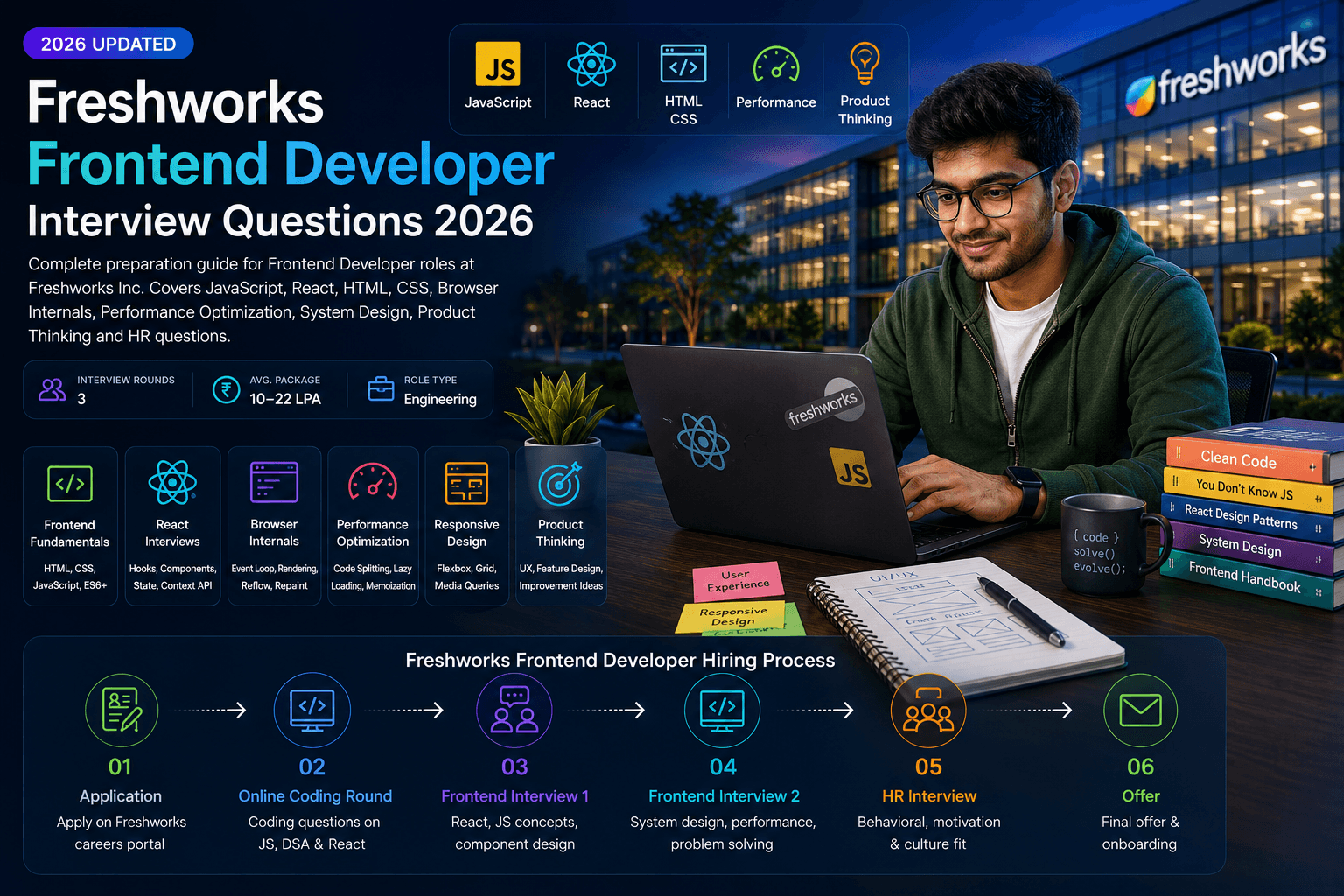
A complete preparation guide covering JavaScript, React, browser internals, CSS, performance optimization, product thinking, and Freshworks' hiring process for frontend developer roles in India.
On this page
Why Freshworks Frontend Interviews Are Different
Freshworks is a product company building SaaS tools used by millions — Freshdesk, Freshchat, Freshsales, and Freshservice. Frontend interviews go beyond framework trivia: panels evaluate whether you can ship production-quality UI with strong JavaScript fundamentals, React architecture, performance awareness, and product thinking.
Unlike service-company frontend loops that focus on HTML/CSS basics, Freshworks probes browser internals, component design under real constraints, and how you would improve their products. Compare patterns with Zoho Frontend Developer questions, Frontend Developer interview questions, and the Freshworks company hub to calibrate your study plan.
Freshworks Hiring Process
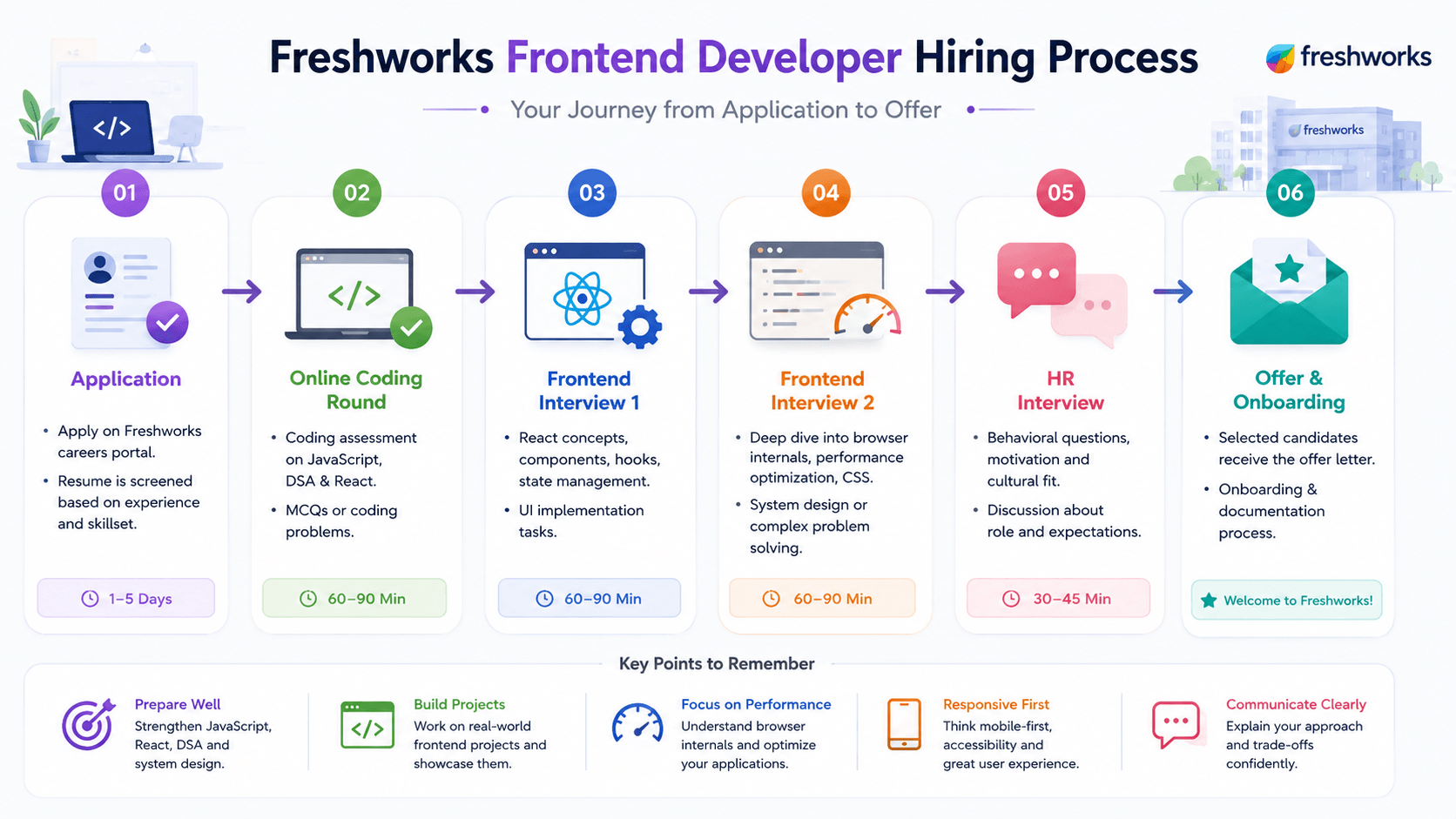
Most Freshworks Frontend Developer loops in India follow the sequence below. Each stage tests a different signal — not a repeat of the previous round.
Step 1 — Resume screening
Recruiters scan for React project depth, measurable UX impact, and product awareness. Highlight Freshdesk-adjacent work — real-time UI, complex forms, accessibility wins, and performance improvements with numbers.
Step 2 — Online coding round
Timed assessment covering JavaScript fundamentals, DSA basics (arrays, strings, objects), and sometimes React MCQs. Expect 60–90 minutes. Practice under clock pressure — many candidates are filtered here before live panels.
Step 3 — Technical interview 1
React concepts, component design, hooks, state management, and live UI implementation tasks. Panels expect you to explain trade-offs aloud while coding — not silent typing. Often includes a small component build (form, list, modal).
Step 4 — Technical interview 2
Browser internals, performance optimization, CSS architecture, and frontend system design. May include “how would you architect this feature?” discussions for Freshdesk-scale SaaS surfaces. Deeper than Round 1.
Step 5 — HR round
Behavioral questions, motivation, cultural fit, and role expectations. Prepare “why Freshworks,” product awareness (Freshdesk, Freshchat, Freshsales), and a concise story about a frontend challenge you solved.
Step 6 — Offer
Selected candidates receive the offer letter followed by onboarding and documentation. Compensation typically ranges 10–22 LPA depending on experience and level. Negotiate the full package after level confirmation.
Hiring process flow
- Application
- Online Coding
- Frontend Round 1
- Frontend Round 2
- HR Interview
- Offer
JavaScript Fundamentals
JavaScript depth is the foundation of every Freshworks frontend round. Panels expect you to explain concepts with code examples and trace execution — not recite MDN definitions.
Closures
What Freshworks evaluates: Whether you understand lexical scope, can explain why closures retain outer variables, and apply them in real patterns (debounce, module pattern, React hooks).
Common mistakes: Describing closures as “functions inside functions” without explaining scope chain, or unable to debug stale closure bugs in async callbacks.
Preparation tips: Practice explaining: outer function returns inner function; inner function closes over outer variables. Write a debounce from scratch and trace which variables persist.
Hoisting
What Freshworks evaluates: Understanding of temporal dead zone, function vs variable hoisting, and whether you can predict output of hoisting edge cases.
Common mistakes: Saying “everything moves to the top” without distinguishing `var`, `let`, `const`, and function declarations.
Preparation tips: Memorize: `var` hoists undefined; `let`/`const` hoist but stay in TDZ until declaration; function declarations hoist fully. Trace 3 hoisting quiz snippets aloud.
Event Loop
What Freshworks evaluates: Call stack, microtask vs macrotask queue ordering, and whether you can explain why `setTimeout(0)` runs after a Promise.
Common mistakes: Conflating event loop with multi-threading, or unable to explain why UI freezes during long synchronous loops.
Preparation tips: Draw the loop: sync code → microtasks (Promises) → macrotasks (setTimeout). Explain how this affects React batching and async state updates.
Promises
What Freshworks evaluates: Promise chaining, error propagation, `Promise.all` vs `Promise.allSettled`, and composing async flows without callback hell.
Common mistakes: Forgetting to return promises in chains, swallowing errors without `.catch`, or nesting `.then` instead of flattening.
Preparation tips: Practice converting callback APIs to Promises, handling parallel fetches with `Promise.all`, and explaining rejection propagation.
Async/Await
What Freshworks evaluates: Clean async code structure, error handling with try/catch, and understanding that await yields to the event loop.
Common mistakes: Using await inside loops sequentially when parallel execution is needed, or missing try/catch around awaited calls.
Preparation tips: Rewrite Promise chains as async/await. Know when to use `Promise.all` with mapped async functions for parallel work.
Scope
What Freshworks evaluates: Block vs function scope, closure implications, and avoiding global namespace pollution in large codebases.
Common mistakes: Using `var` in loops with setTimeout, or creating accidental globals by omitting `const`/`let`.
Preparation tips: Revise scope chain lookup, IIFE/module patterns, and how ES modules provide file-level scope in modern bundlers.
Drill patterns with JavaScript interview questions and DSA interview questions.
React Interviews
Freshworks builds modern React frontends for complex SaaS admin surfaces. Technical Round 1 often includes live component implementation — expect hooks, state management, and performance trade-offs.
Virtual DOM
What Freshworks evaluates: Understanding reconciliation, diffing algorithm basics, and why React batches DOM updates instead of touching the real DOM on every state change.
Common mistakes: Calling it “a copy of the DOM” without explaining diffing, keys, or why unnecessary re-renders still cost performance.
Preparation tips: Explain: JSX → virtual tree → diff against previous tree → minimal real DOM patches. Mention keys in lists and why index keys break on reorder.
Hooks
What Freshworks evaluates: Rules of hooks, custom hook extraction, and correct use of useState, useEffect, useRef, useMemo, and useCallback.
Common mistakes: Calling hooks conditionally, overusing useEffect for derived state, or missing cleanup in subscriptions/timers.
Preparation tips: Build a custom `useDebounce` or `useFetch` hook. Explain dependency array pitfalls and stale closure fixes.
State Management
What Freshworks evaluates: When local state suffices vs Context vs external stores (Redux, Zustand). Freshworks panels probe trade-offs at SaaS scale.
Common mistakes: Putting everything in global state, or using Context for high-frequency updates that cause full-tree re-renders.
Preparation tips: State colocation first. Context for theme/auth. External store when many distant components share mutable state with middleware needs.
Controlled Components
What Freshworks evaluates: Form state ownership, single source of truth, and validation patterns in complex multi-step forms (common in Freshdesk admin UI).
Common mistakes: Mixing controlled and uncontrolled inputs, or fighting React with direct DOM manipulation for form values.
Preparation tips: Default to controlled inputs. Explain when refs make sense (file inputs, third-party widgets). Show validation on blur vs submit.
Context API
What Freshworks evaluates: Provider composition, avoiding unnecessary re-renders with split contexts or memoized values, and when Context is the wrong tool.
Common mistakes: One giant context object that re-renders the entire app on any field change.
Preparation tips: Split contexts by update frequency. Memoize provider values. Compare with prop drilling limits at 3+ levels.
Performance Optimization
What Freshworks evaluates: React.memo, useMemo, useCallback, code splitting, list virtualization, and profiling with React DevTools.
Common mistakes: Premature memoization everywhere, or optimizing before measuring. Wrapping every callback in useCallback without profiling.
Preparation tips: Measure first with Profiler. Memoize expensive computations and stable callbacks passed to memoized children. Lazy-load route-level chunks.
Review React interview questions and build 2–3 portfolio components you can walk through live.
React Architecture
Freshworks panels expect you to trace what happens from a user click to pixels on screen. The flow below is the mental model interviewers want you to narrate — not just name individual React APIs.
React update flow
- User Action
- Component
- State Update
- Virtual DOM
- Diffing
- Real DOM Update
The reconciliation process
Reconciliation is how React decides what changed between renders and applies the smallest possible update to the real DOM. Walk interviewers through these steps in order:
- React schedules a re-render when state or props change — triggered by event handlers, effects, or parent updates.
- The component function runs again, producing a new virtual DOM tree (JSX compiled to React.createElement calls).
- React compares the new tree with the previous snapshot (diffing). It walks both trees node-by-node, using keys to match list items.
- Only nodes with actual changes are marked for update — unchanged subtrees are skipped entirely.
- React batches DOM mutations and applies minimal patches to the real DOM in a single commit phase.
- Concurrent features (React 18+) can interrupt, resume, or discard renders — but the diff-and-patch model remains the same.
Interview tip: Draw this flow on a whiteboard when asked “what happens when I click a button in React?” Start with the event handler, end with the DOM patch — not with “React re-renders.”
Browser Internals
Technical Round 2 probes whether you understand what happens between your JavaScript and the pixels on screen. This separates candidates who debug performance issues from those who only know framework APIs.
Rendering Pipeline
What Freshworks evaluates: Parse HTML → DOM, parse CSS → CSSOM, render tree, layout, paint, composite. Understanding where JS can block rendering.
Common mistakes: Treating “render” as a single step, or unable to explain why CSS in `<head>` matters for first paint.
Preparation tips: Walk through critical rendering path. Explain `defer` vs `async` scripts and how they affect DOMContentLoaded vs load.
Reflow
What Freshworks evaluates: Layout-triggering properties (width, height, position) and strategies to batch DOM reads/writes to avoid layout thrashing.
Common mistakes: Interleaving offset reads with style writes in loops, causing forced synchronous layouts.
Preparation tips: Batch reads then writes. Use `transform` and `opacity` for animations — they skip layout. Mention DocumentFragment for bulk inserts.
Repaint
What Freshworks evaluates: Paint-only changes vs reflow, and which CSS properties trigger which rendering stages.
Common mistakes: Assuming all style changes are equal cost, or animating `top`/`left` instead of `transform`.
Preparation tips: Use compositor-only properties for 60fps animations. Explain `will-change` sparingly and layer promotion trade-offs.
Event Loop (Browser)
What Freshworks evaluates: How browser event loop interacts with rendering — requestAnimationFrame, microtasks starving macrotasks, and long task impact on INP.
Common mistakes: Blocking the main thread with heavy sync work and wondering why the UI freezes during scroll.
Preparation tips: Chunk long work with `requestIdleCallback` or Web Workers. Schedule visual updates in rAF callbacks.
Memory Management
What Freshworks evaluates: Garbage collection basics, common leak patterns (detached DOM nodes, forgotten listeners, closures holding large objects).
Common mistakes: Adding event listeners without cleanup in SPAs, or retaining references in module-level caches indefinitely.
Preparation tips: Always remove listeners in useEffect cleanup. Use WeakMap for caches keyed by DOM. Profile heap snapshots in DevTools.
CSS & Responsive Design
Freshworks products must work across devices and browsers globally. Panels test layout architecture, responsive strategy, and accessibility — not just whether you can center a div.
Flexbox
What Freshworks evaluates: Main/cross axis, flex-grow/shrink/basis, and building responsive nav bars, card rows, and centering without hacks.
Common mistakes: Using flex without understanding `flex: 1` shorthand, or fighting `min-width: auto` overflow in flex children.
Preparation tips: Practice holy-grail layout, sticky footer, and equal-height cards. Know when flex beats grid (1D layouts).
CSS Grid
What Freshworks evaluates: Grid template areas, fr units, auto-fill/minmax for responsive grids, and combining grid with flex for complex dashboards.
Common mistakes: Using grid for simple single-axis layouts, or hardcoding column counts instead of responsive `auto-fit` patterns.
Preparation tips: Build a Freshdesk-style ticket list grid. Use `grid-template-areas` for page shells. Combine subgrid where supported.
Responsive Design
What Freshworks evaluates: Mobile-first breakpoints, fluid typography, container queries awareness, and content-driven breakpoints over device widths.
Common mistakes: Desktop-first CSS with excessive overrides, or fixed pixel breakpoints copied from Bootstrap defaults.
Preparation tips: Start mobile-first with `min-width` media queries. Use `clamp()` for fluid type. Test at 320px, 768px, and 1440px.
Accessibility
What Freshworks evaluates: Semantic HTML, ARIA when necessary, keyboard navigation, focus management, color contrast, and screen reader compatibility.
Common mistakes: Div soup with onClick instead of buttons, missing alt text, or aria-label on everything instead of proper semantics.
Preparation tips: Audit with axe DevTools. Tab through your app without a mouse. Manage focus on modal open/close. WCAG AA contrast minimum.
Mobile First Design
What Freshworks evaluates: Progressive enhancement, touch targets (44px minimum), performance on low-end devices, and network-aware loading.
Common mistakes: Shipping desktop-sized bundles to mobile, or hiding critical content behind hover-only interactions.
Preparation tips: Design core flows for 375px first. Lazy-load below-fold content. Test on real mid-range Android devices, not just Chrome DevTools.
Practice with CSS interview questions.
Frontend Performance
Performance is a first-class concern at Freshworks scale — agents and customers interact with UI under real load. Expect questions on optimization strategies with measurable outcomes.
Code Splitting
What Freshworks evaluates: Route-level and component-level splitting with dynamic import, webpack/vite chunk strategy, and prefetching critical routes.
Common mistakes: One monolithic bundle for the entire app, or splitting so aggressively that waterfall loading hurts UX.
Preparation tips: Split by route with React.lazy + Suspense. Prefetch likely next routes on hover or idle. Analyze bundle with webpack-bundle-analyzer.
Lazy Loading
What Freshworks evaluates: Images (loading="lazy"), components, and data — knowing when lazy hurts LCP vs when it saves bandwidth.
Common mistakes: Lazy-loading above-the-fold hero images, or lazy-loading components needed for first interaction.
Preparation tips: Eager-load LCP image with fetchpriority="high". Lazy-load below-fold images and heavy modals. Intersection Observer for custom lazy patterns.
Memoization
What Freshworks evaluates: When to memoize computations (useMemo), callbacks (useCallback), and components (React.memo) — with measurement evidence.
Common mistakes: Memoizing cheap operations, or creating new object references in render that defeat memoization.
Preparation tips: Profile before memoizing. Stabilize object/array deps with useMemo. Extract static objects outside components.
Bundle Optimization
What Freshworks evaluates: Tree shaking, dead code elimination, analyzing bundle size, replacing heavy libraries, and modern build tooling.
Common mistakes: Importing entire lodash/moment libraries, or shipping duplicate dependencies across chunks.
Preparation tips: Use `import { debounce } from lodash-es`. Replace moment with date-fns. Set bundle size budgets in CI.
Lighthouse
What Freshworks evaluates: Core Web Vitals (LCP, INP, CLS), interpreting Lighthouse audits, and translating scores into actionable fixes.
Common mistakes: Chasing 100 score without fixing real user metrics, or optimizing lab scores while field data stays poor.
Preparation tips: Focus on LCP element, reduce JS execution time for INP, reserve space for images/fonts for CLS. Compare lab vs CrUX field data.
Product Thinking
Freshworks frontend interviews often include product sense questions — especially in later rounds and HR. You do not need PM experience, but you should reason about user pain, prioritization, and success metrics on familiar Freshworks surfaces.
How would you improve Freshdesk?
Freshdesk is a customer support platform used by thousands of agents daily. Strong answers identify a specific agent pain point — ticket triage overload, context switching between channels, or slow search — then propose a measurable UX improvement with clear success metrics (time-to-first-response, tickets closed per hour).
How would you improve Freshchat?
Freshchat handles live messaging and chatbots. Interviewers want user-journey thinking: reduce visitor-to-agent handoff friction, improve chat widget load time on third-party sites, or design better bot-to-human escalation UX. Tie ideas to Freshworks’ multi-product ecosystem.
How would you improve onboarding UX?
SaaS onboarding determines activation and retention. Discuss progressive disclosure, empty states, contextual tooltips vs modal tours, and measuring time-to-first-value. Reference how Freshworks products onboard new admin users without overwhelming them.
What interviewers evaluate
- User empathy — do you start from a real persona pain point, not a feature wishlist?
- Prioritization — can you pick one improvement and defend why it beats alternatives?
- Metrics — do you define how you would measure success (activation rate, task completion time, NPS)?
- Technical feasibility — do you acknowledge engineering constraints and phased rollout?
- Product awareness — do you reference Freshworks products and their user base authentically?
Frontend Project Discussion
Technical Round 1 and HR often open with “tell me about a project you built.” Freshworks interviewers probe six areas below — prepare a 3-minute walkthrough for your best React project covering each one with specific decisions and trade-offs.
Component Architecture
What to cover: How you split UI into reusable, single-responsibility components. Folder structure, container vs presentational patterns, and prop interface design.
Example interviewer questions:
- Walk me through how you structured components in your last project.
- When would you extract a custom hook vs a child component?
- How do you prevent prop drilling in a dashboard with 5+ nesting levels?
API Integration
What to cover: Fetching, caching, error handling, and loading states. REST vs GraphQL trade-offs, optimistic updates, and retry logic for SaaS admin panels.
Example interviewer questions:
- How did you handle API errors and loading states in your project?
- What happens if the user navigates away mid-fetch?
- How would you design data fetching for a paginated ticket list?
State Management
What to cover: Local vs global state decisions, Context vs external stores, and where server state (React Query/SWR) fits alongside client state.
Example interviewer questions:
- Why did you choose that state management approach?
- What state lived locally vs globally, and why?
- How did you handle form state across multi-step wizards?
Performance Optimization
What to cover: Profiling evidence, memoization decisions, code splitting, list virtualization, and bundle size impact — with before/after metrics.
Example interviewer questions:
- What was the slowest part of your app and how did you fix it?
- Did you use React.memo or useMemo? What did profiling show?
- How would you optimize rendering 10,000 rows in a table?
Accessibility
What to cover: Semantic HTML, keyboard navigation, ARIA usage, focus management, color contrast, and screen reader testing on real flows.
Example interviewer questions:
- How did you ensure your app was accessible?
- Walk me through focus management in your modal or drawer component.
- What accessibility audit tools did you use and what did you fix?
Testing
What to cover: Unit tests for utilities/hooks, component tests with React Testing Library, integration tests for critical flows, and what you chose not to test.
Example interviewer questions:
- What testing strategy did you follow and why?
- How do you test a component that fetches data on mount?
- What is the difference between testing implementation details vs user behaviour?
Resume Examples
Freshworks recruiters screen for measurable frontend impact — performance gains, accessibility improvements, UX outcomes, and numbers recruiters can discuss in technical rounds.
Performance gains
Weak resume bullet: “Improved application performance using React.”
Strong resume bullet: “Reduced dashboard initial load from 4.2s to 1.8s (57% faster) by code-splitting routes, lazy-loading charts, and memoizing expensive filter computations — Lighthouse performance score 38 → 82.”
Accessibility
Weak resume bullet: “Made the website accessible.”
Strong resume bullet: “Refactored checkout flow to WCAG 2.1 AA — added keyboard navigation, ARIA live regions for form errors, and 4.5:1 contrast fixes — reducing accessibility-related support tickets 31%.”
UX impact
Weak resume bullet: “Built a new UI for the admin panel.”
Strong resume bullet: “Redesigned ticket assignment UI with drag-and-drop and inline previews — cut average triage time from 45s to 18s per ticket across 200 daily active agents.”
Measurable outcomes
Weak resume bullet: “Worked on responsive design for mobile users.”
Strong resume bullet: “Shipped mobile-first responsive redesign for 12 core pages — mobile bounce rate dropped 22% and mobile conversion increased 15% over 6 weeks (12k MAU).”
Preparation Roadmap
Week 1
JavaScript
- Closures, hoisting, scope — write and explain 5 code snippets aloud.
- Event loop, Promises, async/await — trace execution order on paper.
- ES6+ features: destructuring, spread, optional chaining, modules.
- Practice 10 OA-style JS problems (arrays, objects, strings).
Week 2
React
- Hooks deep dive — custom hooks, useEffect cleanup, dependency arrays.
- Controlled forms, Context API, state management trade-offs.
- Build 2 components live: searchable list + multi-step form.
- React DevTools Profiler — find and fix one unnecessary re-render.
Week 3
Browser + CSS
- Rendering pipeline, reflow/repaint, event loop interaction with rAF.
- Flexbox + Grid layouts — rebuild a dashboard shell from scratch.
- Responsive mobile-first CSS, accessibility audit with axe.
- Lighthouse audit — fix LCP, INP, and CLS on a personal project.
Week 4
Mock Interviews + Product Thinking
- Run 2 timed mock technical rounds (component build + JS deep dive).
- Prepare 3 product improvement answers (Freshdesk, Freshchat, onboarding).
- Polish resume bullets with metrics — performance, a11y, UX impact.
- HR prep: “why Freshworks,” project stories, and salary research.
Review the curated questions below, then run full-loop mocks on InterviewEra mock interviews or drill prompts with the free question generator.
Preparation Resources
Use these guides alongside this Freshworks Frontend Developer hub. Each resource targets a different signal Freshworks evaluates.
Related Interview Preparation Guides
Cross-train with role, topic, and company-specific question banks. Freshworks frontend panels overlap heavily with JavaScript, React, and CSS fundamentals — plus product-company comparisons against peers like TCS and Accenture.
Freshworks Frontend Developer Interview Questions
Placement-oriented · Updated 2026- 01
What is the difference between `==` and `===` in JavaScript?
TechnicalEasyView expert answer & prep guide
Expert answer: `==` compares values after type coercion, while `===` compares both value and type without coercion. In production frontend code, I default to `===` to avoid surprising conversions like `0 == "0"` or `"" == false`. I can still explain rare intentional uses of `==`, such as checking `null` and `undefined` together. In interviews, giving concrete coercion examples and stating a clear coding standard shows stronger JavaScript fundamentals than a one-line definition.
What interviewers evaluate: JavaScript type system fundamentals and whether you write predictable production code.
Answer strategy: Define both operators, give 2 coercion examples, state your team standard (`===` default), mention null-check exception.
Common mistakes: Saying they are interchangeable, or unable to explain any coercion example.
Follow-up questions:
- What is `Object.is` used for?
- How does `typeof null` behave?
- 02
What is the virtual DOM in React and why does it exist?
TechnicalEasyView expert answer & prep guide
Expert answer: Virtual DOM is React’s in-memory representation of UI structure. On state changes, React compares previous and new trees, then applies minimal updates to the real DOM. This model improves developer ergonomics and can reduce costly direct DOM mutations, especially in complex interfaces. I also mention that virtual DOM is not magic speed for every case—component design and rendering patterns still matter. In interviews, I connect reconciliation, keys, and render batching for a complete explanation.
What interviewers evaluate: React mental model depth beyond JSX syntax — reconciliation and update strategy.
Answer strategy: Define virtual DOM, explain diff-and-patch flow, mention keys and that performance still depends on component design.
Common mistakes: Claiming virtual DOM always makes React faster than vanilla JS, or skipping reconciliation entirely.
Follow-up questions:
- Why do list keys matter?
- What triggers a React re-render?
- 03
Explain CSS specificity. Which rule wins: an ID selector or a class selector?
TechnicalEasyView expert answer & prep guide
Expert answer: CSS specificity determines which rule wins when multiple rules target the same element. An ID selector has higher specificity than a class selector, so ID wins unless overridden by `!important` or inline styles in specific contexts. I explain specificity numerically and also mention source order as tiebreaker when specificity is equal. In frontend interviews, I pair this with maintainability advice: avoid overusing IDs and `!important`, and prefer predictable architecture like utility classes or scoped systems.
What interviewers evaluate: CSS debugging ability and whether you can explain cascade conflicts in real codebases.
Answer strategy: State ID beats class, explain specificity weights (inline > ID > class > element), add maintainability note.
Common mistakes: Wrong ordering, ignoring source order tiebreaker, or over-relying on `!important` in answers.
Follow-up questions:
- What beats an inline style?
- How do pseudo-classes affect specificity?
- 04
What is event bubbling in JavaScript? How do you stop it?
TechnicalMediumView expert answer & prep guide
Expert answer: Event bubbling means an event triggered on a child element propagates upward through ancestor elements. I stop propagation using `event.stopPropagation()` when parent handlers should not run. I also distinguish `preventDefault()`, which blocks default browser action but does not stop bubbling. In real apps, I use delegation intentionally for performance on large lists, then selectively stop bubbling for nested interactive controls. Interviewers usually check that you understand phases and practical handling choices.
What interviewers evaluate: DOM event model knowledge and practical handler design in interactive UIs.
Answer strategy: Define bubbling, show stopPropagation vs preventDefault, mention event delegation use case.
Common mistakes: Confusing preventDefault with stopPropagation, or not knowing capture vs bubble phases.
Follow-up questions:
- What is event capturing?
- When is event delegation useful?
- 05
What are the differences between `let`, `const`, and `var`?
TechnicalEasyView expert answer & prep guide
Expert answer: `var` is function-scoped and hoisted with undefined initialization, which can cause subtle bugs. `let` and `const` are block-scoped and respect temporal dead zone before declaration. `const` prevents reassignment of the binding but does not make objects deeply immutable. In modern JavaScript, I default to `const`, use `let` when reassignment is needed, and avoid `var` in new code. A strong interview answer includes scope examples and common loop-related pitfalls.
What interviewers evaluate: Core JavaScript scoping and hoisting — foundational for debugging async and closure bugs.
Answer strategy: Compare scope, hoisting, and reassignment rules; recommend const-first modern style with examples.
Common mistakes: Saying const makes objects immutable, or unable to explain temporal dead zone.
Follow-up questions:
- What is the temporal dead zone?
- How does hoisting affect function declarations?
- 06
What is the difference between controlled and uncontrolled components in React?
TechnicalMediumView expert answer & prep guide
Expert answer: Controlled components keep form state inside React using `value` and `onChange`, giving predictable validation and multi-step workflow control. Uncontrolled components rely on DOM state and refs, useful for simple fields or file inputs. In product UIs like Freshworks-style admin forms, controlled inputs are usually preferred for validation, analytics, and dynamic logic. I also mention not mixing both styles on the same field to avoid warnings and inconsistent behavior during rerenders.
What interviewers evaluate: Form state architecture judgment and React data-flow understanding.
Answer strategy: Contrast state ownership (React vs DOM), give when to use each, warn against mixing on same input.
Common mistakes: Treating all forms as uncontrolled, or not knowing file inputs often need refs.
Follow-up questions:
- How do you validate controlled form fields?
- When would you use react-hook-form?
- 07
How do you optimise the performance of a React application?
TechnicalHardView expert answer & prep guide
Expert answer: I start with profiling, not guesswork. Then I optimize high-impact areas: avoid unnecessary rerenders with memoization where proven useful, split heavy route bundles, virtualize long lists, and reduce expensive synchronous work on render paths. I also improve network and asset performance with lazy loading, caching strategy, and image optimization. In interviews, I present one before/after metric example because measurable impact is stronger than listing techniques without prioritization.
What interviewers evaluate: Performance engineering maturity — measurement-first optimization vs random memoization.
Answer strategy: Lead with profiling, prioritize bundle/network/render bottlenecks, cite one metric-driven fix.
Common mistakes: Sprinkling React.memo everywhere without profiling, or listing techniques with no prioritization.
Follow-up questions:
- When does useMemo hurt performance?
- How do you analyze bundle size?
- 08
How do you ensure cross-browser compatibility in your CSS and JavaScript?
TechnicalMediumView expert answer & prep guide
Expert answer: I use a layered approach: check feature support with caniuse data, transpile JavaScript with Babel targets, add CSS prefixes via Autoprefixer, and rely on progressive enhancement for advanced APIs. I test critical flows on Chrome, Firefox, Safari, and mobile browsers, with focused fallback paths for unsupported features. I prefer feature detection over user-agent sniffing. In product-company interviews, showing a repeatable compatibility process is more valuable than naming isolated browser quirks.
What interviewers evaluate: Production readiness and systematic QA habits for diverse browser environments.
Answer strategy: Describe toolchain (Babel, Autoprefixer), testing matrix, progressive enhancement, avoid UA sniffing.
Common mistakes: Only testing Chrome, or relying on polyfills without understanding bundle cost.
Follow-up questions:
- What is progressive enhancement?
- How do you test Safari-specific issues?
- 09
Tell me about a frontend component or feature you built that you are most proud of.
BehavioralMediumView expert answer & prep guide
Expert answer: I usually discuss a ticket-management table I built with server-side pagination, column filters, keyboard accessibility, and optimistic updates. The hardest part was balancing performance with UX for large datasets. I profiled render bottlenecks, introduced row virtualization, and reduced unnecessary rerenders through stable props and memoized selectors. As a result, interaction latency dropped and adoption improved among internal support agents. I conclude with one improvement area to show reflection, not just self-promotion.
What interviewers evaluate: Project ownership depth, technical trade-offs, and ability to communicate impact with specifics.
Answer strategy: Use STAR: situation, your technical decisions, measurable outcome, one lesson learned.
Common mistakes: Generic tutorial projects, no metrics, or claiming sole credit without explaining your role.
Follow-up questions:
- What would you refactor if you rebuilt it?
- How did you handle error states?
- 10
How would you approach building a fully responsive design from a desktop Figma mockup?
SituationalMediumView expert answer & prep guide
Expert answer: I do not shrink desktop blindly. I define core user tasks, then design mobile-first layouts with content-driven breakpoints. I use fluid spacing/type scales, Flexbox/Grid combinations, and responsive image strategy for performance. I verify edge states—long text, empty states, form errors, and localization. I also sync quickly with designers on ambiguous interactions before implementation drifts. In interviews, this workflow shows practical execution from design handoff to production-ready responsive behavior.
What interviewers evaluate: Design-to-code workflow, responsive CSS craft, and collaboration with designers.
Answer strategy: Mobile-first plan, content-driven breakpoints, layout primitives, edge-case checklist, designer sync.
Common mistakes: Fixed pixel breakpoints only, ignoring touch targets, or skipping empty/error states.
Follow-up questions:
- How do you handle responsive images?
- When do you use container queries?
Frequently Asked Questions
How many interview rounds does Freshworks have for Frontend Developer roles?
Most Freshworks Frontend Developer loops in India have 3 core interview rounds after resume screening: an online coding assessment, two technical frontend rounds (React/JS + browser/performance), and an HR round. Total timeline from application to offer is typically 2–4 weeks.
Does Freshworks hire frontend developers as freshers?
Freshworks primarily hires experienced frontend engineers (1–5+ years), though exceptional campus candidates with strong React portfolios and open-source contributions may be considered. Focus on demonstrable projects with measurable impact rather than CGPA alone.
What JavaScript concepts are most important for Freshworks frontend interviews?
Closures, hoisting, event loop, Promises, async/await, and scope are tested most frequently. Panels expect you to explain concepts with code examples and trace execution order — not just recite definitions.
How much React knowledge is required for Freshworks frontend roles?
Deep React knowledge is essential: hooks, virtual DOM, controlled components, Context API, state management trade-offs, and performance optimization. Expect live component-building tasks in technical Round 1.
Is DSA required for Freshworks frontend interviews?
Yes, but at a moderate level. The online coding round tests arrays, strings, objects, and basic algorithms. Technical rounds focus more on frontend-specific problems than hard LeetCode mediums, but strong JS problem-solving helps.
What salary can a Frontend Developer expect at Freshworks in India?
Freshworks Frontend Developer compensation typically ranges from 10–22 LPA depending on experience level, with senior engineers earning toward the higher end. Packages include base salary, RSUs, and benefits.
Does Freshworks ask system design questions for frontend roles?
Technical Round 2 often includes frontend system design — architecting a feature like a real-time notification panel, infinite scroll ticket list, or multi-tenant widget system. It is lighter than backend system design but tests component architecture and data flow.
What products should I know before a Freshworks frontend interview?
Know Freshdesk (customer support), Freshchat (live chat), Freshsales (CRM), and Freshservice (ITSM). Understanding their user personas — support agents, sales reps, IT admins — helps in product thinking and motivation answers.
How should I prepare for the Freshworks online coding round?
Practice 30–40 JavaScript problems on arrays, strings, and objects under timed conditions. Review React MCQs on hooks, lifecycle, and state. Aim for 60–90 minutes of focused practice daily for two weeks before the assessment.
What makes Freshworks frontend interviews different from service companies?
Freshworks is a product company — panels evaluate product thinking, UX impact, and performance optimization alongside JavaScript/React depth. Service company interviews focus more on framework trivia; Freshworks probes whether you can ship production-quality UI at SaaS scale.
Should I know Ruby on Rails for Freshworks frontend interviews?
Ruby on Rails knowledge is a nice-to-have, not a requirement for frontend roles. Freshworks is migrating toward React frontends with modern backend services. Focus on JavaScript, React, CSS, and browser internals first.
How important is accessibility for Freshworks frontend interviews?
Very important. Freshworks products serve global users including those using assistive technology. Expect questions on semantic HTML, ARIA, keyboard navigation, and WCAG compliance. Include accessibility wins in your resume bullets.